
Overview of the MediaHuman Software Suite
Table of Contents
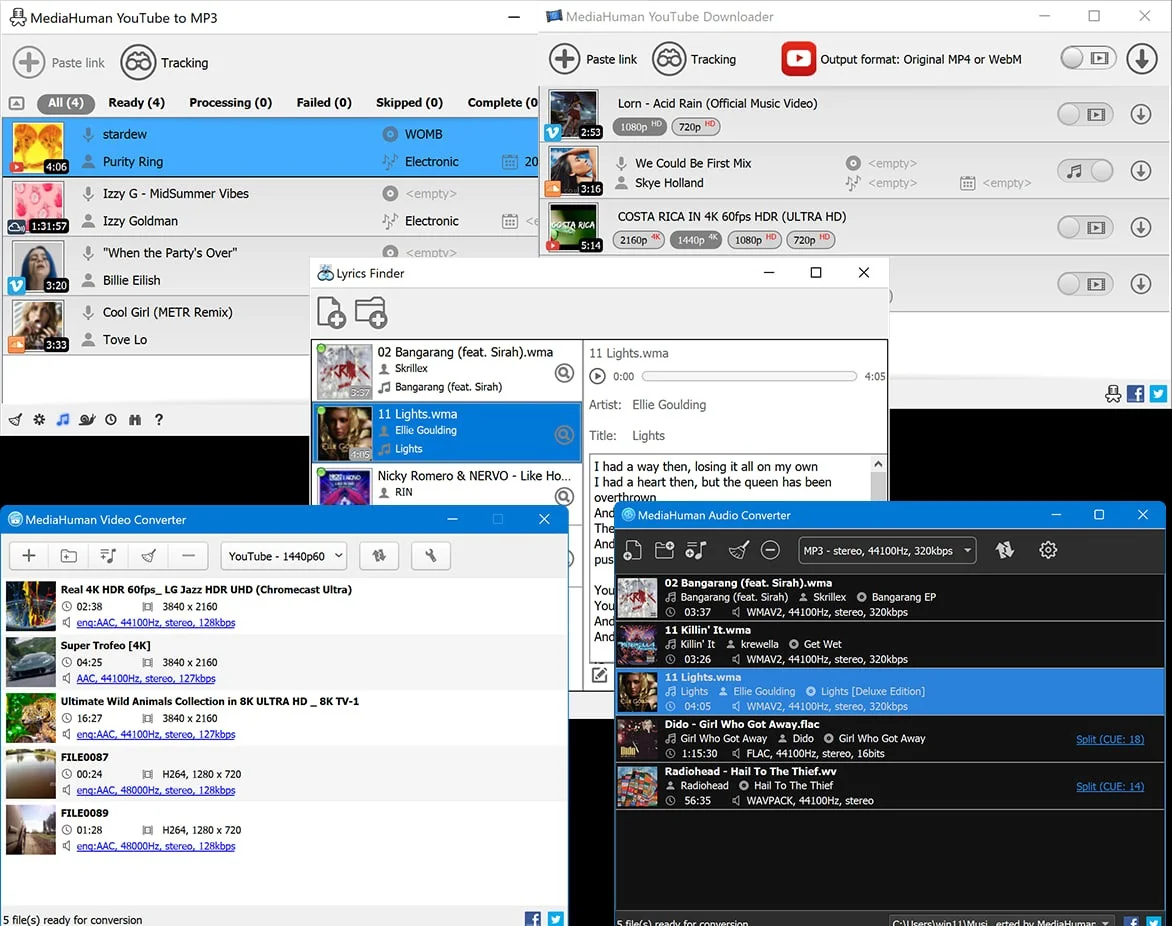
MediaHuman is a trusted software developer known for creating clean, user-focused multimedia utilities. Unlike many tools in this category, MediaHuman applications avoid bloatware, ads, and hidden trackers. The suite includes three primary tools: Audio Converter, Video Converter, and YouTube Downloader (which also extracts MP3).
These applications serve users who need to prepare media files for different devices (iPhone, Android, PlayStation), compress audio for email sharing, or legally back up personal YouTube content (e.g., private playlists or public educational videos). The latest versions (2.3.7 for audio, 2.3 for video, and 3.9.20 for YouTube tools) introduce enhanced 64-bit optimizations and broader codec support.
Key Features Across the MediaHuman Suite
MediaHuman Audio Converter 2.3.7 Key Features
-
Universal format support: Converts between MP3, AAC, OGG, WMA, FLAC, WAV, and Apple Lossless (ALAC).
-
Batch processing: Convert thousands of files in one click while preserving folder structures.
-
CD ripping: Extract audio directly from audio CDs to digital formats.
-
Track metadata preservation: Retains artist names, album art, and genres during conversion.
MediaHuman Video Converter 2.3 Key Features
-
Device presets: One-click optimization for iPhone, iPad, Android smartphones, Apple TV, and gaming consoles.
-
Video editing basics: Trim clips, crop frame dimensions, and rotate footage before conversion.
-
Hardware acceleration: Uses Intel Quick Sync and NVIDIA NVENC for faster encoding.
-
Subtitle embedding: Burns soft or hard subtitles (SRT, ASS) into output files.
MediaHuman YouTube Downloader 3.9.20 & YouTube to MP3 3.9.20 Key Features
-
High-quality downloads: Capture videos in 8K, 4K, 2160p, 1440p, 1080p, and 720p.
-
Audio extraction: Convert YouTube videos directly to MP3 (320kbps max) without intermediate files.
-
Playlist and channel saving: Download entire public playlists or channels in one operation.
-
Format selection: Choose MP4, MKV, AVI, MOV, MP3, M4A, or FLAC from YouTube streams.
What’s New in the Latest Versions (2026 Updates)
Updates in Version 2.3.7.2405 (Audio Converter)
-
Improved FLAC to ALAC conversion speed by 18%.
-
Fixed a metadata encoding bug affecting Japanese and Korean characters.
-
Added support for Windows 11’s native audio pipeline.
Updates in Version 2.3-25.05.2026 (Video Converter)
-
New preset for Apple Vision Pro video formats.
-
Upgraded FFmpeg engine to version 7.0 for better HEVC and AV1 decoding.
-
Resolved a frame-skipping issue when converting 120fps gameplay recordings.
Updates in Version 3.9.20.0306 (YouTube Downloader & YouTube to MP3)
-
Adapted to YouTube’s March 2026 API changes (critical for continued functionality).
-
Faster playlist analysis for playlists over 500 videos.
-
Option to export download logs as CSV for content managers.
System Requirements (All Tools)
| Component | Minimum Specification |
|---|---|
| Operating System | Windows 10 / 11 (64-bit recommended); macOS 11 (Big Sur) or newer |
| Processor | Intel Core i3 or AMD equivalent (x86); Apple Silicon (M1/M2/M3) via Rosetta 2 |
| RAM | 4 GB (8 GB for 4K video conversion) |
| Storage | 200 MB for installation + space for converted media |
| Internet | Required for YouTube Downloader and software updates |
*Note: x64 builds offer better performance for large media files. x86 (32-bit) builds are available for legacy systems.*
Installation Guide (Legitimate Setup)
Step-by-Step for Windows (x64/x86)
-
Visit the official MediaHuman website (avoid third-party download portals).
-
Select your tool and choose the correct architecture: MediaHuman Audio Converter 2.3.7 x64 or x86.
-
Run the
.exeinstaller. If Windows SmartScreen appears, click “More info” then “Run anyway”. -
Follow the setup wizard. Uncheck any optional tool offers (MediaHuman does not bundle adware, but always verify).
-
Launch the application. No license key or crack is required—all tools offer a free tier with limitations (e.g., YouTube Downloader limits to 10 downloads per session in free mode).
Activation for Unlimited Use
Each tool offers a one-time purchase license (no subscription). After purchase, enter the license key via Help > Enter License Key. Do not search for “MediaHuman crack” or “keygen” – these files often contain malware and violate software copyright laws.
How to Use the Software (Practical Tutorials)
Converting audio with MediaHuman Audio Converter
-
Drag and drop WAV, FLAC, or MP3 files into the main window.
-
Click the format icon (top right) and choose your output (e.g., MP3 320kbps for portability).
-
Select a destination folder.
-
Click “Start conversion.” Batch status appears in real-time.
Downloading YouTube to MP3 legally
-
Copy a YouTube video URL (ensure you have permission to download – e.g., your own content or Creative Commons licensed).
-
Open MediaHuman YouTube to MP3.
-
The app auto-detects the clipboard URL. Click “Download”.
-
Select MP3 bitrate (128kbps for podcasts; 320kbps for music archives).
Best Use Cases for MediaHuman Tools
-
Podcast editors: Convert guest WAV interviews to MP3 for email attachment.
-
Teachers: Download public educational YouTube videos offline for classroom use (no internet required).
-
Musicians: Rip personal CD collection to FLAC for archival, then batch convert to ALAC for iTunes.
-
Video editors: Transcode OBS recordings (MKV) to MP4 (H.264) for Adobe Premiere compatibility.
-
Commuters: Extract audio from long conference videos to MP3 for listening on smartphones.
Advantages and Limitations
| Advantages | Limitations |
|---|---|
| Clean, ad-free interface | Free version limits daily YouTube downloads to 10 |
| Preserves high quality (lossless FLAC support) | No DVD/Blu-ray ripping |
| Regular updates for YouTube API changes | Video converter lacks advanced filters (e.g., noise reduction) |
| One-time payment (no subscription) | No Linux version (Windows/macOS only) |
| Portable version available (no installation) | Slower initial launch on first run |
Alternatives to the MediaHuman Suite
| Software | Best For | Key Difference from MediaHuman |
|---|---|---|
| Audacity | Free audio editing & conversion | No batch conversion; steeper learning curve |
| HandBrake | Open-source video transcoding | No YouTube downloading; more codec options |
| 4K Video Downloader | YouTube downloading | Similar features but subscription model |
| VLC Media Player | Playback + basic conversion | Clunky batch interface; no CD ripping |
| Freemake Audio Converter | Simple GUI | Includes adware in installer (security risk) |
Frequently Asked Questions (FAQ)
Is MediaHuman YouTube Downloader legal to use?
Yes – downloading videos you have permission to access (public domain, Creative Commons, or your own content) is legal. Downloading copyrighted movies or music without permission may violate YouTube’s Terms of Service. This article does not endorse piracy.
Can I get MediaHuman Audio Converter for free without a license?
The free version has no time limit but restricts some batch sizes. To unlock unlimited conversions, purchase a license. There is no legitimate “crack” or “activation bypass”.
What is the difference between MediaHuman YouTube Downloader and YouTube to MP3?
-
YouTube Downloader saves video files (MP4, MKV, AVI).
-
YouTube to MP3 extracts only audio (MP3, M4A, FLAC) directly without downloading the video stream.
Does MediaHuman support Apple Silicon (M1/M2/M3)?
Yes. The macOS versions run natively on Apple Silicon via a universal binary, offering faster performance than x86 emulation.
Why is my antivirus flagging the installer?
Some antivirus engines mistakenly flag download managers due to heuristic detection. Always download directly from mediahuman.com. The official files are digitally signed and virus-free.
How do I update from version 2.3.7.2405 to a newer build?
Use the built-in updater: Help > Check for Updates. Manual overwrite installation also preserves your settings.
Final Thoughts
The MediaHuman Software Suite stands out for its transparency, lack of adware, and commitment to legal compliance. While free tier users face download limits, the one-time license fee is reasonable for professionals who routinely handle audio conversion or YouTube backups.
For best results, always use the x64 versions on modern Windows hardware. Avoid any website offering “MediaHuman Audio Converter 2.3.7 crack” or “serial key” – these are often malicious. Instead, support the developer by purchasing a license or using the free tier responsibly.
Our Paid Service
“We do not sell or provide any software. We only offer professional support services. If any software on your system is not working properly, or you are facing installation errors, crashes, or any other technical issue — just contact us. We will help you fix the problem quickly and remotely via AnyDesk. No software will be provided from our side — only expert troubleshooting and support.”