
Overview of the Software
Table of Contents
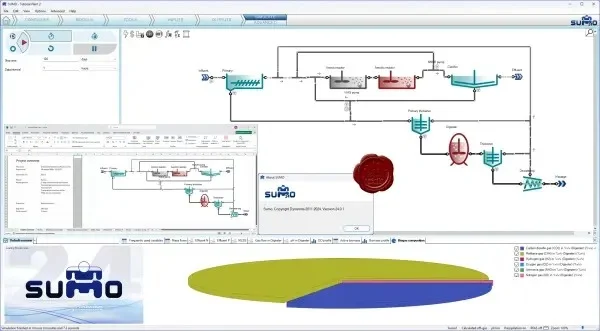
Dynamita SUMO is a specialized simulation platform used for designing, optimizing, and troubleshooting biological wastewater treatment processes. It is widely adopted by consulting engineers, utility operators, and academic researchers. The software excels in modeling complex interactions within activated sludge systems, anaerobic digesters, and nutrient removal pathways.
Version 24.0.1 builds upon a decade of research and field validation. It includes an expanded model library, faster simulation engines, and a redesigned user interface for improved workflow efficiency.
Key Features
-
Comprehensive Model Library: Includes SUMO1 (carbon oxidation, nitrification), SUMO2 (enhanced biological phosphorus removal – EBPR), and SUMO19 (anaerobic digestion with sidestream treatment).
-
Dynamic Process Control: Emulate real plant logic with PID controllers, timers, and event-driven actuators.
-
Fault-Tolerant Simulation: Continue simulations even with missing or noisy data inputs—ideal for real plant data fitting.
-
Batch and Continuous Simulation Modes: Suitable for lab-scale tests or full-scale municipal plant design.
-
Data Reconciliation Tools: Automatically identify and correct measurement errors from historical plant data.
-
Reporting and Visualization: Generate customizable charts, mass balance tables, and energy usage reports.
What’s New in Version 24.0.1
The latest maintenance release focuses on stability and performance:
-
Improved Solver Engine: Faster convergence for complex process configurations, especially those involving digester foaming models.
-
Extended Chemical Dosing Module: Now supports ferric chloride, alum, and polymer addition with real-time pH tracking.
-
Enhanced Import Filters: Directly import historical SCADA data from CSV, Excel, and OPC DA/UA formats.
-
UI Refinements: Dark mode interface, dockable panels, and a new model-building wizard for beginners.
-
Bug Fixes: Resolved memory leak issues when running simulations longer than 30 days.
System Requirements
Before installing, ensure your system meets these specifications:
| Component | Minimum Requirement | Recommended |
|---|---|---|
| Operating System | Windows 10 (64-bit) | Windows 11 Pro (64-bit) |
| Processor | Intel Core i5 (8th gen) | Intel Core i7 or AMD Ryzen 7 |
| RAM | 8 GB | 16 GB or higher |
| Storage | 2 GB free SSD space | 5 GB free NVMe SSD |
| Display | 1366 x 768 | 1920 x 1080 or higher |
| Additional | .NET Framework 4.8 | Excel 2019+ for reporting |
Installation Guide
Follow these steps for a clean, legal installation of Dynamita SUMO v24.0.1:
-
Download the official installer from the Dynamita customer portal. Ensure your license is valid.
-
Disable real-time antivirus temporarily (false positives may occur, but do not download from third-party sites).
-
Run the installer (
SUMO_v24.0.1_Setup.exe) as Administrator. -
Accept the EULA and choose the installation path (default:
C:\Program Files\Dynamita\SUMO). -
Select components: Full installation includes all model libraries and example projects.
-
Complete installation and reboot if prompted.
-
Activate license using your provided USB dongle or online activation key.
How to Use the Software
This section provides a beginner-friendly workflow:
Step 1 – Create a New Project
-
Launch SUMO v24.0.1 → File → New Project.
-
Select a template (e.g., “Standard Activated Sludge with EBPR”).
Step 2 – Build the Process Layout
-
Drag and drop unit processes from the library: influent, bioreactor, clarifier, effluent, waste sludge.
-
Connect them with flow streams.
Step 3 – Configure Parameters
-
Double-click each unit to set volumes, kinetics, and stoichiometry.
-
Use the built-in parameter assistant for typical values.
Step 4 – Define Influent Data
-
Import a dynamic influent file (hourly flow, COD, NH4, PO4, TSS).
-
Use the “Data Generator” if measured data is unavailable.
Step 5 – Run and Analyze Simulation
-
Click “Simulate” → choose duration (e.g., 14 days).
-
Monitor key outputs: effluent quality, oxygen uptake rate (OUR), sludge production.
Best Use Cases
Dynamita SUMO v24.0.1 is not a generic tool. It excels in these specific scenarios:
-
Greenfield Plant Design: Size reactors and clarifiers before construction.
-
Capacity Audits: Determine if an existing plant can handle 20% higher flow.
-
Energy Optimization: Compare aeration strategies (intermittent vs. continuous).
-
Troubleshooting Bulking Sludge: Simulate filamentous bacteria control using selectors.
-
Training Digital Twins: Connect live SCADA data for operator training simulators.
Advantages and Limitations
Advantages
-
Unmatched biological model depth – More detailed than GPS-X or WEST.
-
Open architecture – User-defined models via C++ or Python.
-
Handles missing data – unlike competitors that crash with real-world inputs.
-
Strong support for EBPR and sidestream deammonification.
Limitations
-
Steep learning curve for non-process engineers.
-
Higher license cost than BioWin for small utilities.
-
Limited built-in hydraulic models (no stormwater or sewer network simulation).
-
Requires manual data preparation for complex industrial wastewaters.
Alternatives to the Software
Depending on your needs, consider these legitimate alternatives:
| Software | Best For | Pricing Model | Primary Limitation |
|---|---|---|---|
| Dynamita SUMO v24.0.1 | Research & complex plants | Annual subscription | High cost |
| BioWin (EnviroSim) | Municipal plant operators | Perpetual + maintenance | Less flexible modeling |
| GPS-X (Hydromantis) | Industrial wastewater | Subscription | No built-in EBPR |
| WEST (MIKE by DHI) | Academic research | Educational discount | Slower simulation speed |
| Python + ASM libraries | Budget projects | Free (open-source) | Requires coding |
Frequently Asked Questions
1. Is Dynamita SUMO v24.0.1 suitable for beginners in process modeling?
Partially. The new model-building wizard helps, but basic knowledge of activated sludge mathematics (Monod kinetics) is strongly recommended.
2. Can I use SUMO for MBR (Membrane Bioreactor) design?
Yes. Version 24.0.1 includes a custom MBR tank model with transmembrane pressure and fouling rate estimation.
3. Does the software integrate with real-time SCADA systems?
Yes, via OPC UA. You can create a live digital twin that receives data every 5–60 minutes.
4. What file formats can I export simulation results to?
CSV, Excel (.xlsx), MATLAB (.mat), and plain text. Reporting graphs export as PNG, SVG, or PDF.
5. How does version 24.0.1 differ from version 23?
Major improvements: 40% faster solver, new chemical dosing module, and import filters for modern SCADA protocols.
6. Are there any free or open-source alternatives that work like SUMO?
Yes, but with limitations. The “Activated Sludge Library” for DWSIM (open-source) is free but lacks GUI polish and support.
7. Is training available from Dynamita?
Yes. Dynamita offers 2-day online workshops, on-site training, and a self-paced video library for licensed users.
Final Thoughts
Dynamita SUMO v24.0.1 remains the gold standard for engineers who demand fidelity over simplicity. Its ability to simulate complex biological interactions under real-world data conditions sets it apart from competitors. While the learning curve and price point are higher than some alternatives, the return on investment for a single major plant optimization often exceeds the software cost.
For new users: start with the example projects and consider the official training course. For existing users: version 24.0.1 is a stable, performance-focused upgrade worth implementing.
Our Paid Service
“We do not sell or provide any software. We only offer professional support services. If any software on your system is not working properly, or you are facing installation errors, crashes, or any other technical issue — just contact us. We will help you fix the problem quickly and remotely via AnyDesk. No software will be provided from our side — only expert troubleshooting and support.”