
Overview of the Software
Table of Contents
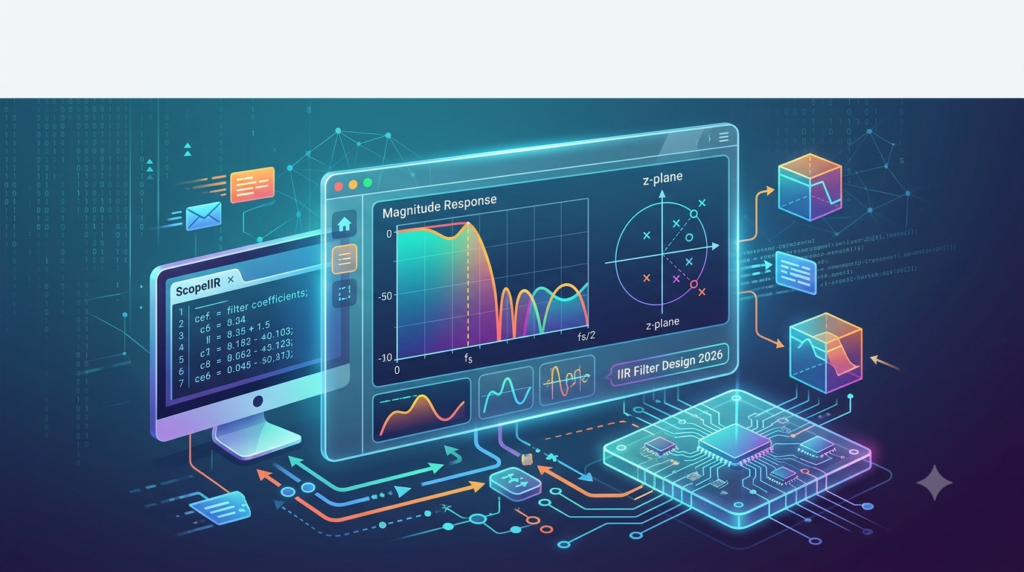
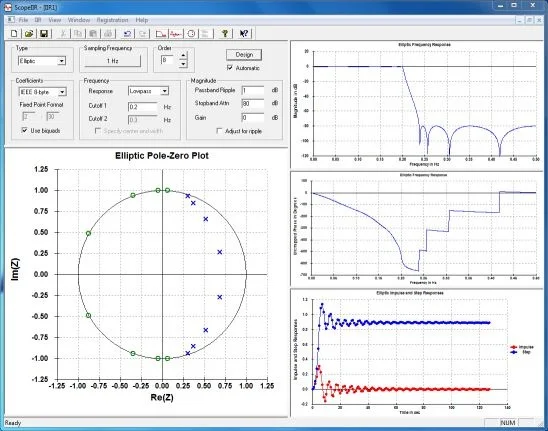
ScopeIIR 2026 is a dedicated software tool for designing IIR digital filters. Unlike general-purpose mathematical platforms, ScopeIIR focuses exclusively on filter design—offering Butterworth, Chebyshev Type I and II, Elliptic, and Bessel approximations. Engineers use it to visualize pole-zero plots, frequency response (magnitude and phase), and filter stability before deploying coefficients to embedded systems or audio plugins.
The 2026 edition introduces an optimized real-time preview engine, making iterative design faster. The software supports double-precision arithmetic and exports coefficients in C++ header files, Python NumPy arrays, and raw text for microcontroller integration.
Key Features
ScopeIIR 2026 provides a focused feature set that eliminates DSP guesswork.
-
Classic Filter Design Methods
-
Butterworth for maximally flat passband response.
-
Chebyshev (Type I and II) for controlled ripple.
-
Elliptic (Cauer) for steepest roll-off.
-
Bessel for linear phase and minimal group delay.
-
-
Real-time Visualization Engine
-
Magnitude response (dB scale).
-
Phase response (degrees or radians).
-
Pole-zero plot with unit circle stability check.
-
Impulse and step response previews.
-
-
Coefficient Export Options
-
Direct-form I and II coefficients.
-
Second-order section (SOS) for numerical stability.
-
Export formats: CSV, MATLAB, Octave, C/C++ header, Python (NumPy/SciPy compatible).
-
-
Cascaded Biquad Designer
-
Automatically splits high-order filters into stable biquad sections.
-
Gain scaling per stage to prevent overflow.
-
-
Interactive Filter Order Tuning
-
Drag-and-drop passband edge frequency.
-
Live update of filter order vs. attenuation trade-off.
-
What’s New in the Latest Version (2026)
The 2026 release focuses on workflow efficiency and educational clarity.
-
Live FIR-to-IIR Comparison Mode – Overlay an equivalent FIR filter response to compare phase linearity and computational load.
-
Z-Plane Grid Snap – When placing custom zeros/poles, snap to 5° angle increments for teaching stability concepts.
-
Python Scripting Console – Automate filter sweeps or batch-export coefficients for 50+ design variants.
-
Dark Mode UI – Reduced eye strain for long analysis sessions.
-
Export to Verilog / VHDL – Beta support for FPGA-based filter implementations.
System Requirements
Before installing ScopeIIR 2026, verify your system meets these requirements.
| Component | Minimum | Recommended |
|---|---|---|
| Operating System | Windows 10 (64-bit), Ubuntu 20.04, macOS 11 | Windows 11 / Ubuntu 22.04 / macOS 13 |
| Processor | Intel Core i3 (2.5 GHz dual-core) | Intel Core i5 or Apple M1/M2 |
| RAM | 4 GB | 8 GB |
| GPU | Integrated, 1280×720 resolution | Dedicated GPU for large pole-zero plots |
| Storage | 500 MB SSD | 1 GB NVMe SSD |
| .NET / Dependencies | .NET 6.0 (Windows) / GTK3 (Linux) | — |
Installation Guide
-
Download the official installer from the publisher’s website (do not use third-party mirrors).
-
Windows: Run
ScopeIIR_2026_Setup.exeand follow the wizard. Select “Add to PATH” for CLI tools. -
macOS: Mount
ScopeIIR_2026.dmgand drag the application to theApplicationsfolder. -
Linux (Ubuntu/Debian):
sudo dpkg -i scopeiir_2026_amd64.deb
sudo apt-get install -f
-
Launch the software. On first run, it will prompt for a license key (free trial for 30 days or educational license).
How to Use the Software
Designing a low-pass IIR filter requires only a few steps.
Step 1: Select Filter Response
-
From the top toolbar:
Design → Low-Pass
Step 2: Set Specifications
-
Passband edge: 3 kHz
-
Stopband edge: 4 kHz
-
Passband ripple: 0.5 dB
-
Stopband attenuation: 40 dB
-
Sampling frequency: 48 kHz
Step 3: Choose Approximation
-
Click
Butterworthfor smooth passband orChebyshev Ifor sharper cutoff.
Step 4: Analyze Response
-
Check the magnitude plot – ensure stopband attenuation meets spec.
-
Inspect pole-zero diagram – all poles must be inside the unit circle.
Step 5: Export Coefficients
-
Click
Export → C Header (SOS)– copy the array into your embedded firmware.
Best Use Cases
ScopeIIR 2026 serves both learning environments and production DSP pipelines.
-
Audio Plugin Development (VST / AU) – Design analog-emulating EQ shelves or crossover filters.
-
Biomedical Signal Processing – Remove 50/60 Hz power line noise from ECG signals using a notch filter.
-
Telecommunications – Implement matched filters for QAM demodulation.
-
Teaching Digital Signal Processing – Visualize how pole radius affects resonance and stability.
-
Embedded Sensor Filtering – Design anti-aliasing filters for low-power ARM Cortex-M microcontrollers.
Advantages and Limitations
Advantages
-
Fast iteration – Real-time response update while dragging cutoff frequencies.
-
Educational transparency – Shows direct-form and SOS coefficient values side-by-side.
-
Low memory footprint – Runs on older lab computers without issue.
-
No cloud dependency – 100% offline functionality after installation.
Limitations
-
No FIR filter design – It is strictly an IIR tool; for FIR, use ScopeIIR’s companion product (ScopeFIR).
-
Windows-centric export defaults – Some Linux users need to manually convert paths for Python scripts.
-
Limited adaptive filter support – No LMS or RLS adaptive filter modules (planned for 2027 release).
Alternatives to the Software
Depending on your workflow, consider these alternatives.
| Software | Best For | Cost | IIR Support | Export Options |
|---|---|---|---|---|
| ScopeIIR 2026 | Dedicated IIR design & teaching | $99 (one-time) | Butterworth, Chebyshev I/II, Elliptic, Bessel | C, Python, CSV, VHDL (beta) |
| MATLAB (Signal Processing Toolbox) | Research & algorithm prototyping | $2,150+ annual | Full + custom analog prototyping | MAT, C, HDL |
| Octave + signal package | Open-source alternative | Free | Similar to MATLAB | Limited to Octave scripts |
| Python SciPy (scipy.signal) | Full control via scripting | Free | Butter, Cheb, Ellip, Bessel | Python, NumPy |
| FilterPro (TI) | Active RC & switched-cap filter design | Free | Analog-focused (not digital IIR) | TI schematic |
When to choose ScopeIIR: You need a standalone, visual tool for teaching or quick digital IIR prototyping without writing code.
Frequently Asked Questions
1. Can ScopeIIR 2026 design high-order IIR filters above 10th order?
Yes, but it automatically converts high-order filters into cascaded second-order sections (biquads) to maintain numerical stability. You can view each biquad stage separately.
2. Does ScopeIIR support fixed-point coefficient quantization?
Yes. Under Tools → Quantization Simulator, you can select 16-bit, 24-bit, or custom word lengths to simulate real-world performance loss.
3. Is ScopeIIR compatible with Apple Silicon (M1/M2/M3)?
The 2026 version runs natively on Apple Silicon via a universal binary. No Rosetta 2 translation is required.
4. Can I import existing filter coefficients from a CSV file?
Yes. Use Import → Coefficient CSV to analyze an existing filter’s frequency response and pole-zero map. This is useful for reverse-engineering legacy systems.
5. How does the free trial differ from the licensed version?
The 30-day trial is fully featured but disables export to C/Python after 30 minutes of cumulative use per session. The licensed version removes all export limits.
6. Does ScopeIIR include a real-time audio input test?
No, it is a design and analysis tool only. For real-time audio testing of your coefficients, use the companion “ScopeIIR Live” module (sold separately).
7. Is there a student or educational discount?
Yes. Verified students and educators receive a 60% discount. Lab licenses for 10+ seats are available at $35 per seat.
Final Thoughts
ScopeIIR 2026 succeeds at its core mission: providing a reliable, educational-grade IIR filter design tool without subscription fees or complexity. For professionals who routinely design audio crossovers, biomedical notch filters, or communications channel equalizers, the new Python scripting and SOS export features save hours of manual coefficient translation. Beginners will appreciate the real-time visual feedback that demystifies pole-zero stability criteria. While it does not replace MATLAB for heavy algorithmic research, ScopeIIR earns its place as a focused, efficient utility in any DSP engineer’s toolkit. Download the trial to verify your next filter design before writing a single line of embedded code.
Our Paid Service
“We do not sell or provide any software. We only offer professional support services. If any software on your system is not working properly, or you are facing installation errors, crashes, or any other technical issue — just contact us. We will help you fix the problem quickly and remotely via AnyDesk. No software will be provided from our side — only expert troubleshooting and support.”