
Overview of ScopeFIR v6.02
Table of Contents
ScopeFIR v6.02 is a specialized software application developed by the Iowa Hills Software Company for advanced Finite Impulse Response (FIR) filter design. Unlike generic DSP tools, ScopeFIR focuses exclusively on the visualization, analysis, and creation of high-performance FIR filters used in digital signal processing.
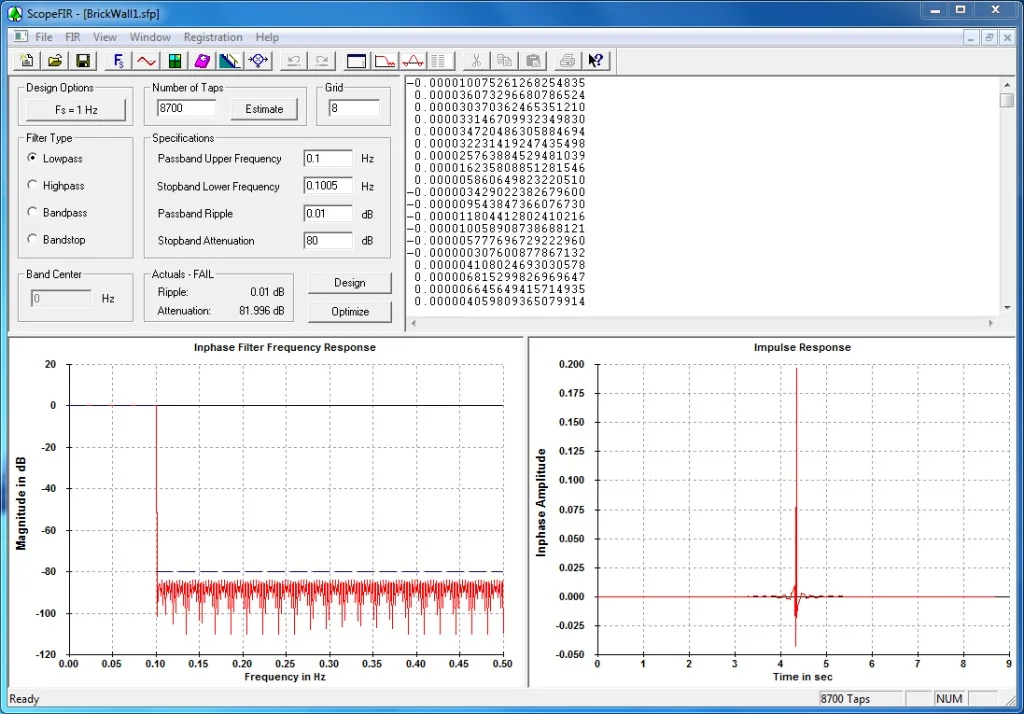
This version (v6.02) continues to serve audio engineers, telecommunications specialists, and embedded systems developers who require precise control over filter coefficients, impulse responses, and frequency response analysis. The software allows users to design low-pass, high-pass, band-pass, and band-stop filters using multiple windowing methods and the Parks-McClellan algorithm.
ScopeFIR v6.02 distinguishes itself by providing instant visual feedback. As you adjust parameters such as the number of taps, cut-off frequency, or transition width, the software simultaneously updates the impulse response, magnitude response, phase response, and pole-zero plots. This real-time iteration is critical for engineers optimizing signal-to-noise ratio (SNR) and minimizing pass-band ripple.
Key Features
ScopeFIR v6.02 offers a robust set of features tailored for professional DSP workflows:
-
Multiple Design Methods:
-
Parks-McClellan (Equiripple) algorithm for optimal filter design
-
Window-based design (Kaiser, Hamming, Hann, Blackman, Bartlett)
-
Frequency sampling method
-
-
Analysis and Visualization Tools:
-
Magnitude response (dB and linear scales)
-
Phase response and group delay plots
-
Impulse response visualization
-
Pole-zero diagrams
-
Step response simulation
-
-
Coefficient Export:
-
Outputs coefficients as C-header files, ASCII text, or CSV
-
Supports fixed-point and floating-point formats
-
Direct copy to clipboard for MATLAB or Python integration
-
-
Advanced Filter Types:
-
Hilbert transformers
-
Differentiators
-
Nyquist filters (L-branch)
-
Raised Cosine and Root-Raised Cosine filters
-
-
Real-Time Comparison Mode: Overlay multiple filter designs on the same graph for side-by-side performance evaluation.
What’s New in ScopeFIR v6.02
Version 6.02 introduces several refinements over previous releases:
-
Improved Numeric Precision: Enhanced double-precision processing reduces rounding errors for filters with more than 500 taps.
-
Optimized Parks-McClellan Solver: Faster convergence for extreme filter specifications (e.g., very narrow transition bands).
-
User Interface Tweaks: Resizable analysis windows and improved zoom functionality for examining pass-band ripple below 0.001 dB.
-
Expanded File Export Options: Native support for 64-bit coefficient files used in modern FPGA and ARM Cortex-M7 DSP libraries.
System Requirements
Before installing ScopeFIR v6.02, ensure your workstation meets these specifications:
| Component | Minimum | Recommended |
|---|---|---|
| Operating System | Windows 10 (64-bit) | Windows 11 or Windows Server 2022 |
| Processor | 1.5 GHz dual-core | 2.5 GHz quad-core or higher |
| RAM | 2 GB | 4 GB or more |
| Disk Space | 50 MB | 100 MB (for project files) |
| Display Resolution | 1366 x 768 | 1920 x 1080 or higher |
*Note: ScopeFIR v6.02 is a native Windows application. It does not run natively on macOS or Linux, but users report successful operation via Wine 8.0+ or virtual machines.*
Installation Guide
Follow these steps to install ScopeFIR v6.02 correctly:
-
Download the Installer: Obtain the official
ScopeFIR_v602_Setup.exefrom the Iowa Hills Software website. Verify the digital signature. -
Run as Administrator: Right-click the installer and select “Run as administrator” to ensure registry permissions.
-
Accept License Agreement: Read the end-user license agreement (EULA). This is proprietary software; no activation bypass or unauthorized modifications are permitted.
-
Choose Installation Directory: Default path is
C:\Program Files\Iowa Hills\ScopeFIR\. Custom locations are supported. -
Complete Installation: After a 10–15 second installation, launch ScopeFIR from the Start Menu or desktop shortcut.
How to Use ScopeFIR v6.02
Designing a Low-Pass FIR Filter
-
Launch ScopeFIR and click File > New Design.
-
Under the Specifications Panel, set:
-
Filter Type: Low-Pass
-
Sampling Frequency (Fs): 48000 Hz (audio standard)
-
Passband Edge (Fp): 18000 Hz
-
Stopband Edge (Fst): 21000 Hz
-
-
Choose Design Method:
-
For equiripple: Select Parks-McClellan, set passband ripple to 0.01 dB and stopband attenuation to -80 dB.
-
For windowed: Select Kaiser window, adjust beta factor to control side-lobe roll-off.
-
-
Click “Design” – ScopeFIR calculates the coefficients and displays the frequency response.
-
Analyze Results: Use the zoom tool to inspect pass-band flatness. Check the Impulse Response tab to ensure symmetry (linear phase property).
-
Export Coefficients: Go to File > Export > C Header. Choose floating-point output for simulation or fixed-point with 16-bit scaling for embedded DSP chips.
Comparing Two Filters
-
Use Design > Add New Design to create a second filter with different parameters.
-
Click the Comparison Mode button (overlapping graph icon). ScopeFIR will color-code each response.
-
Evaluate trade-offs between tap count (latency) and stopband rejection.
Best Use Cases for ScopeFIR v6.02
ScopeFIR v6.02 excels in specific professional scenarios:
| Industry | Use Case | Why ScopeFIR |
|---|---|---|
| Audio Engineering | Digital crossover networks for studio monitors | Precise phase-linear filtering preserves stereo imaging. |
| Telecommunications | Pulse shaping for QAM modems | Root-Raised Cosine filter design with adjustable roll-off factor. |
| Biomedical Signal Processing | Removing 60 Hz power-line interference from ECG signals | Narrow stopband filters with high attenuation. |
| Embedded Systems | Anti-aliasing filters for ADC front-ends | Export coefficients directly into C for ARM Cortex-M4. |
| Acoustics Research | Room impulse response inversion | Design inverse filters using Hilbert transformer option. |
Advantages and Limitations
Advantages
-
No Code Bloat: Exports only coefficients, not a library – ideal for memory-constrained microcontrollers.
-
Real-Time Visual Feedback: Adjust a slider; see the frequency response update instantly.
-
Deterministic Behavior: Unlike adaptive filters, FIR designs from ScopeFIR are reproducible and stable.
-
Transparent Algorithms: Iowa Hills provides documentation on the math behind each design method.
Limitations
-
Windows Only: No native version for macOS, Linux, or web-based deployment.
-
No IIR Support: ScopeFIR handles only FIR filters. For Infinite Impulse Response (IIR) design, consider ScopeIIR (separate product).
-
Tap Count Ceiling: While v6.02 handles up to 10,000 taps, extremely long filters (e.g., 50,000 taps) may cause memory slowdowns.
-
User Interface Age: The interface uses legacy Windows forms; lacks dark mode or high-DPI scaling on some 4K monitors.
Alternatives to ScopeFIR
If ScopeFIR v6.02 does not meet your workflow needs, consider these alternatives:
| Software | Platform | Best For | Key Difference |
|---|---|---|---|
| MATLAB DSP System Toolbox | Windows, macOS, Linux | Academic research and algorithm prototyping | Full simulation environment with code generation, but expensive. |
| Python + SciPy (signal.firwin2) | Cross-platform | Open-source projects | Free, scriptable, but lacks GUI visualization. |
| GNU Octave with signal package | Cross-platform | Cost-free MATLAB alternative | No native real-time graph updates. |
| FilterLab (Microchip) | Windows | Microchip MCU integration | Limited to Microchip devices; fewer design algorithms. |
| ScopeIIR | Windows | Users needing both FIR and IIR | Separate product; IIR filters only. |
Frequently Asked Questions
1. What is the difference between ScopeFIR and ScopeIIR?
ScopeFIR designs Finite Impulse Response filters, which always have linear phase and are inherently stable but require more taps. ScopeIIR designs Infinite Impulse Response filters, which use fewer taps but introduce non-linear phase and can become unstable.
2. Can ScopeFIR v6.02 import filter coefficients from a text file?
Yes. Use File > Import > Coefficients from ASCII. The file must contain one coefficient per line, in order from h[0] to h[N-1]. This is useful for testing coefficients generated by other software.
3. Does ScopeFIR support half-band or interpolated FIR (IFIR) filters?
Version 6.02 includes a Half-band filter preset for decimation applications. IFIR is not directly supported, but you can design a half-band filter and manually increase the sampling rate in post-processing.
4. Is there a free trial or demo mode?
Iowa Hills Software offers a fully functional 30-day trial of ScopeFIR v6.02. The trial imposes no tap limits but adds a small watermark to exported coefficient files. No license bypass or time extension cracks are available or endorsed.
5. What is the maximum number of filter taps?
ScopeFIR v6.02 supports up to 10,000 taps in the GUI. For designs exceeding 10,000 taps, you can use the command-line version (sold separately). Most practical audio and telecom filters use between 32 and 512 taps.
6. Can I use ScopeFIR for real-time audio processing?
ScopeFIR is a design tool, not a real-time processor. You export the coefficients and then implement the filter in your own code (C, Python, or assembly) on a DSP chip or microcontroller.
7. How do I verify my filter meets specifications?
Use the Analysis > Check Specs tool. ScopeFIR will report passband ripple deviation, stopband minimum attenuation, and transition width error relative to your entered targets.
8. Does ScopeFIR v6.02 run on Windows 11 ARM?
Not natively. On Windows 11 ARM64 systems, ScopeFIR runs under Microsoft’s x86 emulation layer. Performance remains acceptable for filters under 1,000 taps.
Final Thoughts
ScopeFIR v6.02 remains a reliable, specialized tool for engineers who require deterministic FIR filter design without the overhead of MATLAB or the scripting curve of Python/SciPy. Its strength lies in focused functionality: you launch the software, design a filter, analyze it, and export coefficients – all within a few minutes.
The 2026 iteration (v6.02) brings necessary numeric improvements and export flexibility, though the interface remains utilitarian. For teams developing audio crossovers, biomedical signal filters, or telecom pulse-shaping stages, ScopeFIR justifies its cost through efficiency and accuracy.
If your work involves linear-phase filtering with strict passband requirements, ScopeFIR v6.02 is a worthy addition to your DSP toolkit. For those needing IIR filters or multi-platform support, evaluate the alternatives above. Always obtain software licenses legally from Iowa Hills Software to ensure you receive updates and malware-free executables.
Our Paid Service
“We do not sell or provide any software. We only offer professional support services. If any software on your system is not working properly, or you are facing installation errors, crashes, or any other technical issue — just contact us. We will help you fix the problem quickly and remotely via AnyDesk. No software will be provided from our side — only expert troubleshooting and support.”