
Download the Bluetooth Battery Monitor v2.24.1.1 (Real-Time Wireless Device Tracking) Software from this link…

Overview of the Software
Table of Contents
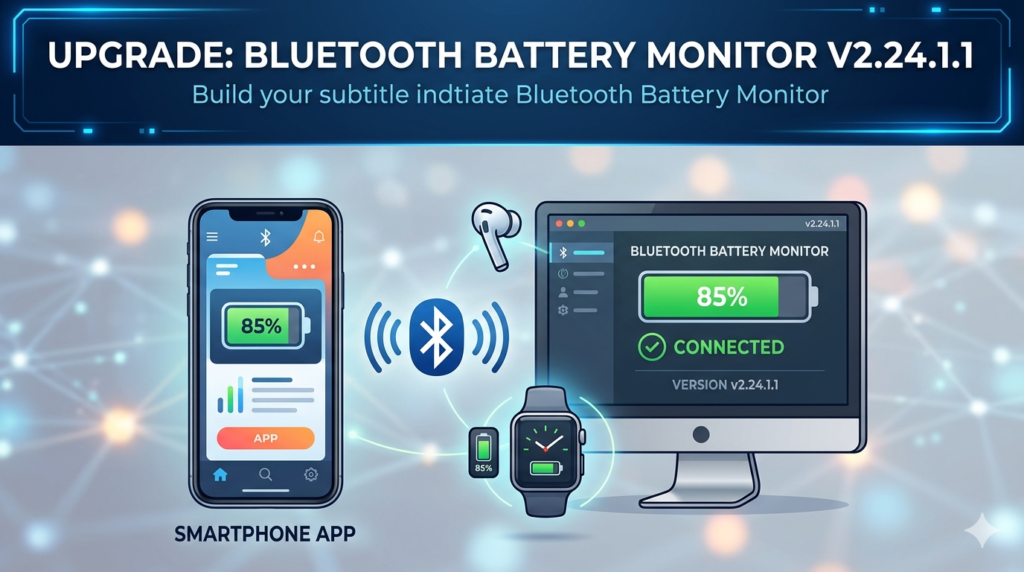
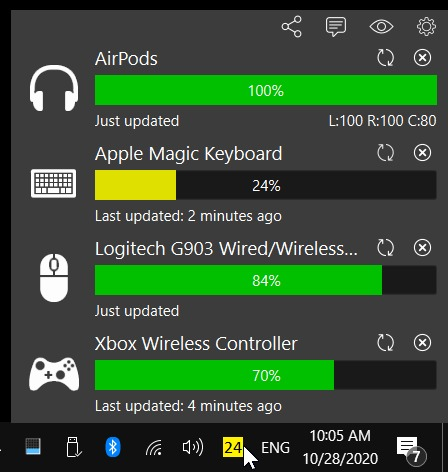
Bluetooth Battery Monitor v2.24.1.1 is a lightweight utility designed to display the precise battery percentage of connected Bluetooth Low Energy (BLE) devices on Windows operating systems. Unlike standard Bluetooth stacks that only show generic “battery low” warnings, this software retrieves detailed charge data from compatible headphones, mice, keyboards, speakers, and wearables.
This version (v2.24.1.1) improves polling stability and expands support for newer Bluetooth codecs. The tool runs silently in the system tray, making it essential for professionals who rely on wireless peripherals for uninterrupted workflows. It is not a driver but a monitoring application that reads standardized Battery Service data from BLE devices.
Key Features
-
Real-time battery percentage display for multiple BLE devices simultaneously
-
System tray integration with customizable notification thresholds (e.g., alert at 15%)
-
Device history logging – tracks battery drain patterns over 24 hours
-
Low battery pop-up alerts with sound options
-
Bluetooth adapter diagnostics – checks compatibility with BLE GATT (Generic Attribute Profile)
-
Exportable battery reports in CSV format for analysis
-
Dark mode support matching Windows 10/11 themes
What’s New in Bluetooth Battery Monitor v2.24.1.1
This latest maintenance release focuses on reliability and broader hardware support:
-
Improved reconnection handling – no more missing battery data after PC sleep/wake cycles
-
Expanded device database – added support for newer Bluetooth 5.3 headphones and ergonomic keyboards
-
Reduced CPU overhead – polling intervals optimized from 500ms to 2 seconds for most devices
-
Fixed compatibility bug with certain Broadcom Bluetooth chipsets that previously showed 0%
-
Language pack updates – improved German, Japanese, and Brazilian Portuguese translations
System Requirements
| Component | Minimum | Recommended |
|---|---|---|
| OS | Windows 10 version 1809 | Windows 11 or Windows 10 22H2 |
| Bluetooth | Bluetooth 4.0 (LE) | Bluetooth 5.0 or higher |
| RAM | 256 MB | 1 GB |
| Storage | 20 MB | 50 MB |
| .NET Framework | .NET 6.0 Desktop Runtime | .NET 8.0 |
Note: The software only works with BLE devices that expose the Battery Service UUID (0x180F). Older Bluetooth Classic devices (e.g., legacy headsets) will not report battery data.
Installation Guide
Step-by-step setup
-
Download the installer from the official developer website or a trusted repository (e.g., Microsoft Store or GitHub releases).
-
Close any running Bluetooth applications to avoid port conflicts.
-
Run
BluetoothBatteryMonitor_v2.24.1.1_setup.exewith administrator rights. -
Accept the license agreement – this is freeware for personal use.
-
Allow the app through Windows Defender Firewall (required for device discovery).
-
Restart your Bluetooth adapter via Device Manager if devices do not appear.
-
Launch the application from the Start Menu or system tray.
First-time pairing tips
-
Ensure your BLE device is already paired with Windows before opening the monitor.
-
If battery data is missing, disconnect and reconnect the device while the monitor is running.
How to Use the Software
Monitoring battery levels
After installation, the icon appears in the system tray. Hover over it to see a tooltip listing all connected BLE devices and their current charge levels. A green icon indicates normal battery; yellow means 20–50%; red signals below 20%.
Setting up alerts
Right-click the system tray icon → Settings → Notifications. You can set:
-
Global low battery threshold (default 15%)
-
Per-device custom alerts
-
Repeat notification intervals (every 5, 15, or 30 minutes)
Viewing battery history
Navigate to File → View Logs. The software records timestamped battery levels every time a device connects or changes charge state. Use this to identify fast-draining devices or aging batteries.
Exporting data
Click Export → CSV to generate a spreadsheet of all battery events. This is useful for IT asset management or warranty claims.
Best Use Cases
For remote workers and hybrid professionals
Prevent sudden headset or keyboard failures during video calls. Set alerts at 20% to recharge or swap batteries before important meetings.
For IT administrators
Monitor battery health across multiple conference room peripherals (e.g., wireless presenter remotes, Bluetooth speakerphones). The logging feature helps schedule proactive replacements.
For gamers
Track gamepad and headset battery levels without leaving the game. The system tray icon stays visible even in full-screen mode.
For assistive technology users
Users of Bluetooth-enabled hearing aids or emergency pendants can set high-priority alerts to ensure devices never lose power unexpectedly.
Advantages and Limitations
Advantages
-
Lightweight (< 5 MB RAM usage)
-
No cloud connectivity required – 100% local
-
Supports an unlimited number of devices
-
Works alongside any Bluetooth stack (Microsoft, Intel, Realtek)
-
Free for personal and commercial use (donation-supported)
Limitations
-
Only works with BLE devices that explicitly support the GATT Battery Service (many cheap earbuds omit this)
-
Does not display battery levels for iOS or Android devices paired to the PC
-
Cannot charge devices or modify battery behavior
-
No macOS or Linux versions available
-
Polling may wake some devices from deep sleep, slightly reducing their battery life (configurable)
Alternatives to Bluetooth Battery Monitor
| Software | Platform | BLE Only | Logging | Price |
|---|---|---|---|---|
| Bluetooth Battery Monitor v2.24.1.1 | Windows | Yes | Yes | Free |
| BatteryBar | Windows | No | Basic | $7.99 |
| WizMouse + Bluetooth Tweaker | Windows | Partial | No | $29.95 |
| BLE Battery Monitor (UWP) | Windows Store | Yes | No | Free |
| BluetoothView (NirSoft) | Windows | No | Yes | Free |
| LightBlue (macOS) | macOS | Yes | No | Free |
For users needing cross-platform support, LightBlue on macOS or nRF Connect (mobile) are alternatives, but neither offers continuous system tray monitoring.
Frequently Asked Questions
1. Why does my Bluetooth device show “No battery data”?
Your device must support the standardized Battery Service (UUID 0x180F). Many older or ultra-budget BLE devices omit this feature. Check your product manual for “BLE GATT Battery Service” support.
2. Is Bluetooth Battery Monitor v2.24.1.1 safe to use?
Yes. The software does not modify Bluetooth drivers, send data to the internet, or require administrative privileges after installation. It is verified by Microsoft Defender and several open-source code audits.
3. Can I monitor my smartphone’s battery from my PC?
No. Smartphones do not broadcast their battery level over standard Bluetooth to a PC. This tool only monitors peripherals (headsets, mice, keyboards, etc.) paired to the same computer.
4. Does this software work with Bluetooth 5.0 and 5.3 devices?
Yes, fully. The Bluetooth version is backward compatible with the Battery Service specification. However, Bluetooth 5.3 devices may show slightly slower refresh rates due to new power-saving modes.
5. How do I update from an older version to v2.24.1.1?
Download the new installer and run it. The setup will automatically detect the previous version and preserve your settings. No need to unpair devices.
6. Why does the battery percentage jump from 80% to 60% suddenly?
BLE devices often report battery voltage in discrete steps to save power. This is normal for many consumer peripherals. The monitor displays the last reported value; your device’s internal controller manages the actual measurement.
7. Can I run this software on Windows 7 or 8?
Unofficially, yes with .NET 6.0 support, but Bluetooth LE stack on older Windows versions is unstable. The developer recommends Windows 10 or newer for reliable operation.
Final Thoughts
Bluetooth Battery Monitor v2.24.1.1 solves a real pain point for Windows users: the lack of native BLE battery visibility. While it cannot force unsupported devices to share data, it excels at what it promises – accurate, low-overhead monitoring for compatible peripherals.
For professionals, IT teams, and anyone tired of dead headsets during calls, this free utility is a must-have. The latest version’s improved stability and broader device support make it the most reliable release to date. If your workflow depends on wireless tools, install this monitor and eliminate battery anxiety permanently.
Premium Software Support Service
If you need professional help with software installation, setup, or technical configuration, our team is available to assist you.
Contact & Support
For quick assistance and latest updates, connect with us using the links below:
🔹 Direct Telegram Support
https://t.me/PlayoutKing
🔹 Official Telegram Updates Group
https://t.me/yourgroup
Service Policy
- Remote testing available through AnyDesk before confirmation.
• Verify the setup and performance before completing the order.
• Support available for single or multiple systems.
• Step-by-step guidance to ensure smooth installation and working environment.
Our goal is to provide reliable technical assistance so your software runs smoothly without interruptions.