

Download the Tactic Pro V8.0.0 (Advanced Sports Analysis Telestrator Software for Broadcast & Coaching) Software from this link…

Overview of the Software
Table of Contents
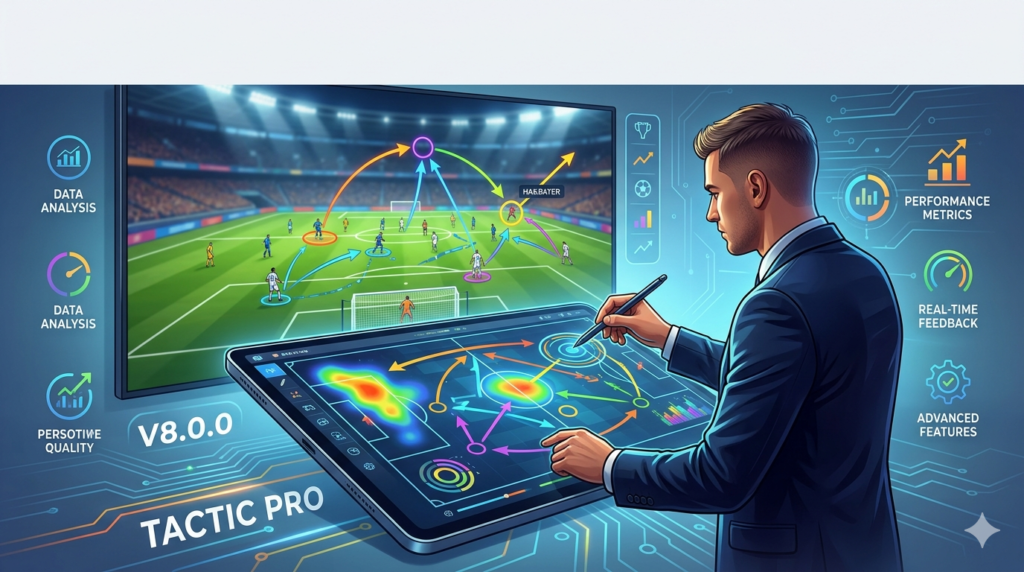
Tactic Pro V8.0.0 is a professional-grade sports analysis and tactical telestration software designed for broadcasters, coaches, and high-performance analysts. Unlike basic video review tools, this platform combines frame-by-frame video analysis with a digital drawing board, allowing users to visually annotate match footage in real time. It is widely adopted in football (soccer), basketball, and hockey for breaking down complex tactical movements, player positioning, and set-piece execution.
The latest version, V8.0.0, focuses on enhancing live broadcast integration and streamlining the workflow between data scientists and coaching staff. By merging structured event coding with telestration graphics, Tactic Pro enables teams and networks to deliver immediate, visually compelling analysis. This tool transforms raw game footage into actionable tactical insights, supporting evidence-based decisions for match preparation, player development, and live commentary.
Key Features
-
Multi-Angle Telestration Tools: Draw, highlight, and animate player movements using arrows, zones, and motion paths. Ideal for breaking down defensive rotations or attacking transitions.
-
Customizable Event Coding System: Create a personalized tagging library (e.g., “high press,” “overload,” “transition”) to categorize every key match action.
-
Synchronized Video Playback: Import multiple camera angles and sync them with tactical drawings. Review plays at variable speeds from 0.1x to 0.5x for micro-analysis.
-
Performance Dashboards: Generate automated statistical reports including possession heatmaps, pass networks, and individual player involvement metrics.
-
Broadcast-Ready Output: Export annotated clips as MP4 or MOV with transparent telestration layers for live TV or streaming platforms.
-
Cloud Collaboration Hub: Share analysis projects with remote coaching staff. Players can access individual feedback clips via a secure web portal.
-
GPS & Wearable Integration: Overlay physical performance data (sprint distance, heart rate zones) onto video events to correlate fatigue with technical errors.
What’s New in Tactic Pro V8.0.0 (2026 Release)
The 2026 update introduces several major enhancements:
-
AI-Assisted Tagging: Machine learning now suggests event tags based on on-field action recognition (e.g., automatically detecting a “counter-attack” or “offside trap”).
-
Real-Time Telestration for Live Broadcasts: Draw directly on a low-latency video feed during a live match, with output ready for half-time shows.
-
Enhanced 3D Pitch View: Switch between 2D and 3D tactical boards. Animate player runs and passing lanes in three-dimensional space.
-
Faster Export Engine: Render 4K analysis clips up to 40% faster than V7.0 due to GPU acceleration.
-
Advanced Search Filters: Query your entire match library using natural language (e.g., “Show all goals conceded from set pieces in the last 6 weeks”).
System Requirements
| Component | Minimum Specification | Recommended Specification |
|---|---|---|
| OS | Windows 10 (64-bit) or macOS 12 | Windows 11 / macOS 14 (Sonoma) |
| CPU | Intel Core i5 (8th gen) / AMD Ryzen 5 | Intel Core i7 (12th gen) / AMD Ryzen 7 |
| RAM | 8 GB | 16 GB (32 GB for 4K projects) |
| GPU | Integrated Intel UHD Graphics | NVIDIA GeForce RTX 3060 / AMD Radeon RX 6600 |
| Storage | 10 GB free SSD | 20 GB free NVMe SSD |
| Display | 1920 x 1080 | 3840 x 2160 (for telestration precision) |
| Internet | 10 Mbps for cloud sync | 50 Mbps for live broadcast telestration |
Installation Guide
For Windows Users
-
Download the official installer from the developer’s website (do not use third-party sources).
-
Right-click the
.exefile and select Run as Administrator. -
Accept the license agreement and choose the installation directory (default:
C:\Program Files\TacticPro). -
Select components: include “Broadcast Plugin” if using live telestration.
-
After installation, activate your license using the 25-character product key.
For macOS Users
-
Mount the downloaded
.dmgfile by double-clicking it. -
Drag the Tactic Pro icon into the Applications folder.
-
Open Finder → Applications → right-click Tactic Pro → Open (to bypass Gatekeeper for the first run).
-
Sign in with your organizational account or enter a standalone license.
First-Time Setup Tips
-
Calibrate your drawing tablet (if used) under Settings → Input Devices for smoother telestration.
-
Import a test match clip (MP4 or MOV, H.264 codec) to verify playback performance.
-
Configure auto-save to cloud every 5 minutes to prevent data loss during live analysis.
How to Use the Software (Workflow Guide)
Step 1 – Import & Organize Footage
-
Drag and drop match videos into the Media Library. Use folders to separate “Home Games,” “Away Games,” and “Opponent Scouts.”
Step 2 – Create a Tactical Timeline
-
Play the video and press the Spacebar to drop an event marker.
-
Assign a tag (e.g., “Goal Chance,” “Defensive Error”) from your custom coding panel.
-
For telestration, click the Pen Tool and draw directly on the frame. Use arrow keys to advance frame-by-frame.
Step 3 – Build a Statistical Report
-
Navigate to the Analytics tab. Select the match or a specific player.
-
Click Generate Summary to produce possession %, pass completion, and heatmaps.
-
Export as PDF or CSV for presentation to head coaches.
Step 4 – Share & Collaborate
-
Highlight a 15-second sequence. Click Export Clip and choose “Player Feedback Mode” (no telestration overlays, only isolated action).
-
Upload the clip to the Cloud Hub and assign it to individual players via email notification.
Best Use Cases
-
Live Broadcast Analysis: Telestrators use the software to explain offside calls or goal-scoring patterns during half-time shows.
-
Professional Club Scouting: Analysts code 10+ opponent matches to identify recurring attacking patterns (e.g., 68% of attacks come down the left wing).
-
Youth Academy Development: Coaches create individual highlight reels for U-15 players, showing three specific defensive positioning errors to correct.
-
Post-Match Debrief: Head coach uses the 3D tactical board to walk through three failed pressing sequences from the first half.
-
Sports Science Integration: Correlate a winger’s sprint distance (from GPS) with each failed dribbling attempt in the final third.
Advantages and Limitations
Advantages
-
Broadcast-Grade Telestration: Superior to generic drawing tools (e.g., PowerPoint or basic video editors).
-
Fast Clip Retrieval: Search for “all corners in the second half” in under 2 seconds, even from a 90-minute match.
-
Scalable Licensing: Works for a single analyst or a 20-person technical staff.
-
Offline Mode: Full functionality without internet; syncs changes when reconnected.
Limitations
-
Learning Curve: New users typically need 4–6 hours of guided training to master event coding and telestration shortcuts.
-
No Native Mobile App: Players cannot view assigned clips on iOS/Android without using the web portal.
-
Hardware Dependent: 4K multi-angle analysis requires a dedicated GPU; integrated graphics cause lag.
-
Price Point: Professional licenses start at $1,200/year, which may exceed budgets for amateur clubs.
Alternatives to Tactic Pro V8.0.0
| Software | Best For | Key Difference | Starting Price |
|---|---|---|---|
| Hudl Sportscode | Elite team data integration | Superior statistical database but weaker live telestration | $1,500/year |
| Dartfish | Biomechanics & injury rehab | Excellent for frame-by-frame movement analysis | $1,000/year |
| KlipDraw | Quick, lightweight telestration | No video analysis engine; only drawing overlay | $300/year |
| LongoMatch | Open-source / budget-conscious | Free version available, but lacks broadcast output options | Free / $300 pro |
| Nacsport | Scouting & tagging depth | Strong on event coding, minimal 3D tactical board | $600/year |
Frequently Asked Questions (FAQ)
Q1: Is Tactic Pro V8.0.0 compatible with live TV broadcast servers?
Yes. The software supports NDI (Network Device Interface) and SDI input via Blackmagic cards, allowing direct telestration on a live camera feed.
Q2: Can I use Tactic Pro without an internet connection?
Absolutely. All core features (video analysis, tagging, telestration) work offline. Cloud sync and collaboration require an internet connection.
Q3: Does Tactic Pro include pre-built tactical templates for specific formations?
Yes. Templates for 4-3-3, 4-4-2, 3-5-2, and 4-2-3-1 are included. You can also create and save custom formation templates.
Q4: What video formats are supported?
MP4, MOV, AVI, MKV, and MTS. The recommended codec is H.264 or H.265 for optimal performance.
Q5: How does the AI-assisted tagging work?
The model was trained on over 10,000 professional match clips. It recognizes actions like “shot on target,” “foul,” “offside,” and “throw-in” with ~89% accuracy (you can manually correct errors).
Q6: Can players access their individual analysis clips without a license?
Yes. Coaches can generate secure, expiring links to specific clips. Players view these in any web browser at no extra cost.
Q7: Is there a free trial available?
The developer offers a 14-day fully functional trial. No credit card is required, but export resolution is limited to 720p during the trial.
Q8: Does Tactic Pro support dual monitors?
Yes. Recommended setup: Video analysis on monitor 1, telestration controls and timeline on monitor 2.
Final Thoughts
Tactic Pro V8.0.0 establishes itself as a leading solution for sports professionals who require more than just video playback. Its combination of broadcast-ready telestration, AI-assisted tagging, and deep statistical reporting addresses the needs of three distinct user groups: live TV analysts demanding low-latency drawing tools, scouts requiring structured event coding, and coaches looking for clear visual communication tools.
While the learning curve and hardware requirements may deter casual users, serious organizations—from professional clubs to advanced academies—will find that the software delivers a measurable return on investment through faster, more accurate tactical insights. The 2026 update’s focus on real-time broadcast features and 3D visualization keeps Tactic Pro competitive against alternatives like Hudl and Dartfish.
For teams committed to evidence-based coaching and data-driven player development, Tactic Pro V8.0.0 offers a reliable, legally compliant, and professionally supported platform. Always download the software directly from the official developer to ensure you receive legitimate updates, technical support, and security patches.
Premium Software Support Service
If you need professional help with software installation, setup, or technical configuration, our team is available to assist you.
Contact & Support
For quick assistance and latest updates, connect with us using the links below:
🔹 Direct Telegram Support
https://t.me/PlayoutKing
🔹 Official Telegram Updates Group
https://t.me/yourgroup
Service Policy
- Remote testing available through AnyDesk before confirmation.
• Verify the setup and performance before completing the order.
• Support available for single or multiple systems.
• Step-by-step guidance to ensure smooth installation and working environment.
Our goal is to provide reliable technical assistance so your software runs smoothly without interruptions.