

Download the SRT Mini Server V2.6.2 (Build 226) 16 Lines Edition from this link…

Overview of the Software
Table of Contents
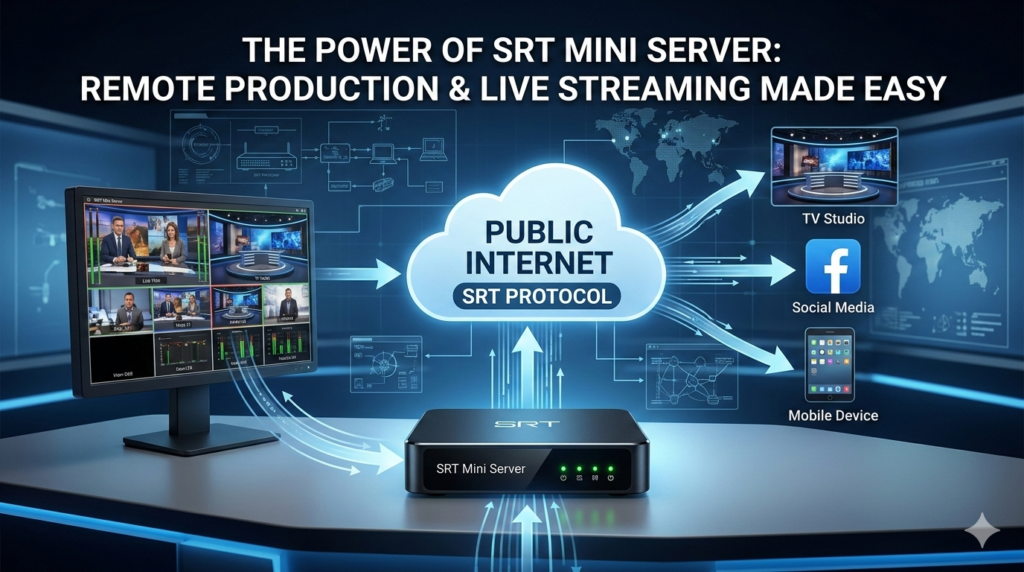
The SRT Mini Server (Version 2.5) is a powerful, lightweight, and highly efficient software solution designed to simplify professional live video workflows. At its core, the SRT Mini Server acts as a robust bridge between various video protocols. It reliably receives streams—primarily via the SRT (Secure Reliable Transport) protocol or MPEGTS—and converts them into SDI, NDI, or RTMP outputs for seamless integration into production environments.
Whether you are using multiple RTMP-enabled cameras like a GoPro, broadcasting directly from an Android or iOS device, or integrating WebRTC sources, this server ensures very low latency and stable performance. It is engineered to be a critical component for broadcasters, AV professionals, and developers who need a dependable, flexible, and secure way to transport high-quality video over unpredictable networks.
Patch Proof


Key Features
The SRT Mini Server packs a comprehensive set of features into a compact and efficient package.
1. Multi-Protocol Streaming and Conversion
The server excels at bridging different streaming technologies. It supports a wide array of input and output formats, ensuring compatibility with virtually any modern production workflow.
-
Input Handling:Seamlessly ingests streams via SRT, RTMP, RTSP, and WebRTC (via the WHEP protocol).
-
Output Flexibility:Converts incoming streams to SDI, NDI, RTMP, or SRT for distribution to switchers, encoders, and streaming platforms.
-
Stream Relaying:Functions as a powerful relay server, pushing streams to multiple destinations simultaneously.
2. Advanced Video and Audio Processing
Maintaining broadcast-grade quality is a priority. The server includes several processing tools to ensure the best possible output.
-
Codec Support:Leverages efficient H.264 and H.265 video compression and AAC audio codec for crystal-clear sound.
-
Adaptive Transcoding:Features an automatic transcoding engine that can dynamically adjust stream parameters to match varying network speeds and end-user device requirements.
-
Format Support:Handles both Interlace and Progressive formats with options for upscaling to meet specific production needs.
3. Precision Synchronization and Switching
For multi-camera productions, sync is paramount.
-
Timecode Sync:Utilizes advanced synchronization algorithms, including support for LTC (Linear Timecode) methods, to perfectly align multiple video sources.
-
Live Switching:The built-in Preview/Switcher mode allows operators to monitor multiple feeds and seamlessly switch between them in real time.
-
SMPTE 2022-7 Support:Ensures hitless, seamless switching between redundant streams, providing unparalleled reliability for critical broadcasts by eliminating disruptions caused by packet loss.
4. Lightweight and Developer-Friendly Design
Despite its powerful capabilities, the server is designed for efficiency and integration.
-
Cross-Platform Compatibility:Runs flawlessly on Windows, various Linux distributions, embedded Linux systems, and other cross-platform environments.
-
Optimized Footprint:Its small size and clear, well-organized code structure make it ideal for embedded development projects and custom integrations.
-
External API Control:Offers a robust API for external control, enabling automated workflows like scheduled recordings when integrated with system tools like Windows Task Scheduler.
What’s New in Version 2.5
The latest update to the SRT Mini Server focuses on expanding connectivity, enhancing automation, and improving reliability.
-
WebRTC (WHEP) Support:The server can now receive WebRTC streams via the WHEP protocol. This allows for direct integration with browser-based sources and services like VDO.ninja, Millicast, and Dolby.io, which can then be converted to SDI or NDI outputs.
-
External API for Automated Recording:A new external API enables powerful automation. For example, it can be integrated with Windows Task Scheduler to start and stop recordings based on a strict schedule, perfect for unattended, overnight broadcast logging.
-
Enhanced Stream Dumping Mode: A new continuous dump mode saves incoming SRT streams into a single file. This is distinct from standard recording and is designed for deep stream quality analysis and forensic review.
-
Refined Synchronization Algorithm: The core sync engine has been completely redesigned based on user feedback from large-scale events. This results in even greater precision and stability, especially when using LTC timecode for multi-camera productions.
-
SMPTE 2022-7 Integration: Adds support for seamless stream redundancy, ensuring flawless transmission by automatically switching between primary and backup streams without any glitches.
System Requirements
The SRT Mini Server is designed to be lightweight and adaptable. The specific requirements will depend on the number of streams and processing tasks (e.g., transcoding), but general guidelines are as follows:
-
Operating System: Windows 10/11, Windows Server, or modern Linux distributions (Ubuntu, Debian, CentOS). Embedded Linux versions are also available.
-
Processor: Multi-core Intel or AMD processor (x64 architecture). More cores are beneficial for multiple streams and transcoding.
-
Memory: Minimum 4GB of RAM. 8GB or more recommended for production environments.
-
Network: Stable internet connection with sufficient upload bandwidth for your streaming needs. Gigabit Ethernet recommended for high-bitrate or multiple streams.
-
Storage: SSD recommended for reliable recording and stream dumping.
Installation Guide
Getting started with the SRT Mini Server is straightforward. The following steps cover a standard installation on a Windows system.
-
Download the Software: Visit the official SRT Mini Server website or authorized distributor to download the latest version (2.5) installer for your operating system.
-
Run the Installer: Locate the downloaded
.exefile (for Windows) and double-click to run it. Follow the on-screen prompts, accepting the license agreement. -
Choose Installation Directory: Select the destination folder for the software or use the default path.
-
Complete Installation: Click “Install” and allow the process to finish. Once done, you can launch the SRT Mini Server from the Start Menu or desktop shortcut.
-
Initial Configuration: Upon first launch, you will be greeted by the updated GUI. You can immediately begin configuring your inputs and outputs via the intuitive control panel.
For Linux installations, pre-compiled binaries or source code is typically available. Instructions usually involve downloading the package and running a setup script or using a package manager.
How to Use the Software
The SRT Mini Server’s user-friendly interface makes stream management simple. Here is a basic workflow for setting up an SRT input and an NDI output.
-
Navigate to the Main Dashboard: Open the SRT Mini Server application. The main screen provides an overview of all active streams and system status.
-
Configure an Input (Listener):
-
Click on the “Inputs” or “Listeners” tab.
-
Select “Add New Input” and choose “SRT Listener.”
-
Configure the port (default is 1234) and any stream ID or encryption parameters (AES-128/256) if required by your source.
-
Click “Save” or “Apply.” The server will now be listening for an incoming SRT connection.
-
-
Configure an Output (Pusher):
-
Click on the “Outputs” or “Pushers” tab.
-
Select “Add New Output” and choose “NDI Output.”
-
Give the output a name (e.g., “Camera 1 Feed”).
-
In the “Source” dropdown, select the SRT input stream you just created.
-
Click “Save” or “Apply.”
-
-
Start Streaming:
-
With your input listener active and output configured, have your remote device (e.g., a smartphone app) start pushing an SRT stream to your server’s IP address and the designated port.
-
The SRT Mini Server will automatically receive the stream and begin publishing it as an NDI source, which can now be discovered and used by any NDI-compatible software or hardware on your network.
-
Best Use Cases
The SRT Mini Server is a versatile tool that solves real-world problems across various industries.
-
Remote News Gathering: Field reporters can use a smartphone with a camera app to stream high-quality video back to the studio via SRT. The server in the studio receives this stream and converts it to SDI or NDI, allowing the reporter to appear as a professional source in the broadcast, complete with two-way communication. This eliminates the need for expensive satellite trucks and large crews.
-
Multi-Camera Sports Production: Capture every angle of a game by deploying several untethered cameras around a field. Each camera sends its feed via SRT to the central SRT Mini Server. The server’s advanced timecode sync ensures all angles are perfectly aligned, allowing a director to switch between them seamlessly as if they were all hard-wired into a production switcher.
-
High-Quality Remote Guest Integration: Move beyond the limitations of Zoom or Skype. A remote expert or celebrity can connect using a simple encoder that sends an SRT stream. The SRT Mini Server receives this broadcast-quality feed and integrates it directly into the studio’s production pipeline, making the remote speaker look and sound like they are in the studio.
-
Automated 24/7 Content Logging: For a TV channel needing to record its overnight feed, the server’s external API can be set up with a scheduler. The system automatically starts recording at 1 AM and stops at 6 AM, saving the file without any human intervention, ensuring compliance and content archiving.
Advantages and Limitations
Advantages
-
Exceptional Reliability: The SRT protocol, with its built-in packet recovery and support for SMPTE 2022-7, ensures stable streams even on poor networks.
-
Enterprise-Grade Security: AES 128/256-bit encryption protects content in transit, and the firewall-friendly nature of SRT minimizes security risks.
-
Unmatched Flexibility: Supports a vast ecosystem of protocols (SRT, RTMP, NDI, SDI, WebRTC) and platforms, fitting into almost any workflow.
-
Cost-Effective: As an open-source solution, it eliminates licensing fees and long-term contracts, making high-end streaming accessible to organizations of all sizes.
-
Precision and Control: Advanced synchronization, a switcher mode, and detailed offset controls give users professional-grade command over their productions.
Limitations
-
Learning Curve: While the interface is user-friendly, understanding the nuances of the SRT protocol (like stream ID, latency settings, and encryption) may require some initial learning.
-
Hardware Dependent: For intensive tasks like transcoding multiple 4K streams, the performance is entirely dependent on the power of the host hardware.
-
Reliance on Network Configuration: While firewall-friendly, proper port forwarding and network configuration are still necessary for receiving streams from the public internet.
Alternatives to the Software
While the SRT Mini Server is a powerful and cost-effective choice, other solutions exist depending on your specific needs.
-
vMix: A comprehensive software-based video production suite that includes its own SRT support and powerful mixing, recording, and streaming capabilities. It is a more feature-heavy but also more expensive alternative.
-
OBS Studio (Open Broadcaster Software): A free and popular open-source alternative. With plugins, OBS can send and receive SRT streams. However, it is more focused on encoding and streaming to platforms rather than acting as a dedicated multi-protocol conversion server.
-
Haivision Play and Hub: As the creators of the SRT protocol, Haivision offers a range of professional hardware and software encoders, decoders, and management platforms. These are enterprise-grade solutions that are typically more expensive.
-
FFmpeg: A powerful command-line tool for processing video and audio. A skilled user can use FFmpeg to create a custom SRT server or converter, but it requires significant technical expertise and lacks the user-friendly GUI of the SRT Mini Server.
Frequently Asked Questions
1. What is the primary function of the SRT Mini Server?
The SRT Mini Server is a software application designed to receive, process, and convert live video streams. Its primary function is to act as a bridge, taking streams from protocols like SRT, RTMP, or WebRTC and outputting them to production-ready formats such as NDI, SDI, or RTMP.
2. How does the SRT Mini Server ensure stream security?
It leverages the SRT protocol’s built-in AES encryption (128 and 256-bit). This secures the stream from the source to the server, protecting valuable content during transmission. Its handshake process also keeps firewall ports closed until a connection is authenticated.
3. Can I use this server to record streams automatically?
Yes. Version 2.5 includes an external API that can be used to trigger recordings. This allows for advanced automation, such as using Windows Task Scheduler to start and stop recordings at specific times, ideal for unattended operation.
4. Is it possible to sync multiple camera feeds with this server?
Absolutely. The SRT Mini Server features a redesigned synchronization algorithm that uses timecode (like LTC) to perfectly align multiple incoming streams. This ensures lip-sync and frame-accurate switching for multi-camera productions.
5. Do I need a static public IP address to use it with remote sources?
Not necessarily. One of the key benefits of SRT is its ability to easily traverse firewalls. While a static IP can simplify connections, the server can work with dynamic IPs and is often used in conjunction with an SRT Caller/Listener model, where the remote source initiates the connection.
6. What are the main improvements in version 2.5?
Version 2.5 introduces support for receiving WebRTC (WHEP) streams, an external API for automated recording, a continuous stream dump mode for analysis, a more precise synchronization algorithm, and support for the SMPTE 2022-7 seamless protection switching protocol.
Final Thoughts
The SRT Mini Server, particularly with its version 2.5 update, stands out as an essential tool for anyone serious about live video production. It masterfully combines the security and reliability of the SRT protocol with the flexibility needed to fit into modern, software-defined workflows. By bridging the gap between remote sources and professional studios, it empowers broadcasters, event producers, and content creators to achieve high-quality results without prohibitive costs or complexity.
Whether you are producing a live sports event, integrating a remote guest, or setting up an automated recording system, the SRT Mini Server offers a stable, feature-rich, and trustworthy foundation for your streaming infrastructure. Its open-source nature and active development community ensure it will continue to evolve, meeting the challenges of tomorrow’s broadcasting landscape.
Premium Software Support Service
If you need professional help with software installation, setup, or technical configuration, our team is available to assist you.
Contact & Support
For quick assistance and latest updates, connect with us using the links below:
🔹 Direct Telegram Support
https://t.me/yourusername
🔹 Official Telegram Updates Group
https://t.me/yourgroup
🔹 WhatsApp Community Group
https://chat.whatsapp.com/yourlink
Service Policy
- Remote testing available through AnyDesk before confirmation.
• Verify the setup and performance before completing the order.
• Support available for single or multiple systems.
• Step-by-step guidance to ensure smooth installation and working environment.
Our goal is to provide reliable technical assistance so your software runs smoothly without interruptions.