
Download the Screaming Frog SEO Spider V23.3 (The Ultimate Technical SEO Crawler) from this link…

Overview of the Software
Table of Contents
Screaming Frog SEO Spider is a cornerstone tool in the technical SEO industry. Developed by a UK-based company, it has earned a reputation for its flexibility, depth of analysis, and ability to handle projects of any scale, from small business sites to massive enterprise-level domains with hundreds of thousands of URLs. Unlike cloud-based crawlers, its desktop application provides users with real-time results, complete control over the crawling process, and the ability to perform complex, custom data extractions without limitations on data storage.
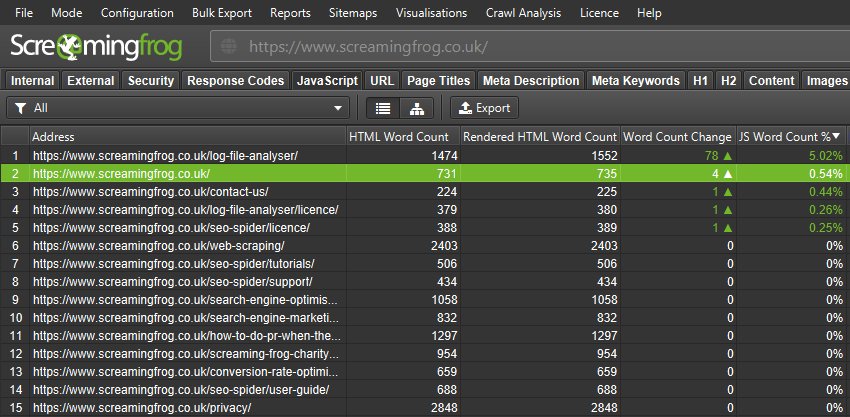
The tool functions by crawling a website’s links, resources (like images, CSS, and JavaScript), and code. It then presents a wealth of data in a structured, spreadsheet-like interface, allowing SEOs to filter, sort, and export insights for everything from broken link analysis to advanced structured data validation. Its primary purpose is to empower marketers, developers, and SEO specialists with the data needed to make informed, strategic decisions for improving a site’s search engine visibility.
Key Features
The Screaming Frog SEO Spider’s utility comes from its comprehensive suite of features designed to address every facet of technical SEO.
Spot Hidden Link Errors
A foundational feature is the ability to crawl a website and instantly identify broken links (4xx client errors) and server errors (5xx). The tool not only flags the broken URL but also provides the source URL where the broken link originated. This allows for efficient bulk exporting of issues, which can then be delegated to a development team for rapid resolution, saving countless hours in manual checks.
Simplify Redirect Management
During site migrations, mergers, or restructuring, managing redirects is critical. The SEO Spider excels at auditing redirect chains and loops. It can identify temporary (302) versus permanent (301) redirects, uncover long chains that dilute link equity, and spot loops that create crawl traps. Users can upload a list of URLs to verify redirect paths, ensuring that link equity is preserved and user experience remains seamless.
Optimize Titles and Metadata
For content-heavy sites, manually auditing page titles and meta descriptions is impractical. The tool crawls and aggregates all meta data, allowing you to filter for issues such as:
-
Missing titles or descriptions.
-
Duplicate titles or descriptions that can cannibalize search results.
-
Length issues (too long or too short for optimal display in SERPs).
-
Poorly optimized or non-unique content.
This provides a clear, actionable dashboard for optimizing critical on-page elements.
Uncover Duplicate Content
Duplicate content can severely impact a site’s ability to rank. The SEO Spider uses an MD5 algorithmic checksum to identify exact duplicate content across pages. It also helps uncover near-duplicates by comparing page titles, headings, and other elements. This feature is instrumental in identifying thin content pages that need consolidation or improvement, helping to build a stronger, more authoritative site structure.
Custom Data Extraction
This advanced feature transforms the tool from a simple crawler into a versatile data extraction engine. Using XPath, CSS Path, or regex (regular expressions), users can scrape virtually any data from a web page. For e-commerce sites, this means extracting product SKUs, prices, availability status, or review counts. It can also be used to pull social meta tags (Open Graph, Twitter Cards), author information, or any other structured data point, centralizing data collection that would otherwise require multiple tools or manual effort.
Check Robots and Directives
Technical audits are incomplete without a thorough review of crawl directives. The SEO Spider displays which pages are blocked by robots.txt, and surfaces meta robots directives (like noindex, nofollow), X-Robots-Tag HTTP headers, and canonical tags. It flags conflicting directives (e.g., a page with a self-referencing canonical that is also noindex), ensuring that search engines interpret your instructions correctly.
Build Smart XML Sitemaps
The tool allows for the creation of highly customized XML and Image sitemaps. Users can include or exclude specific URLs based on filters, set priorities, and add last-modified dates with advanced configuration. This ensures that search engines are provided with a clean, organized, and up-to-date indexing blueprint, a crucial step for large websites to manage crawl budget effectively.
What’s New in Version V23.3
Version 23.3 of the Screaming Frog SEO Spider continues to refine its core functionality with user-driven enhancements. While always checking the official changelog for the most minute details, this version focuses on:
-
Improved JavaScript Rendering: Enhancements to the built-in JavaScript rendering engine for more accurate crawling of modern, JS-heavy websites (like single-page applications or sites built with React, Angular, or Vue.js).
-
Performance Optimizations: Speed improvements for crawling and processing large datasets, making it more efficient for enterprise-level audits.
-
Bug Fixes and Stability: General maintenance updates that ensure compatibility with the latest operating system updates and web standards.
System Requirements
To run the Screaming Frog SEO Spider effectively, your system should meet the following requirements:
| Requirement | Minimum | Recommended |
|---|---|---|
| Operating System | Windows 7+, macOS 10.13+, Linux (via universal installer) | Latest stable version of Windows, macOS, or Linux |
| RAM | 4 GB | 8 GB or more (for large sites) |
| Processor | Dual-core 2.0 GHz | Multi-core processor for faster processing |
| Disk Space | 500 MB for application | SSD with ample space for storing large crawl exports |
| Java | Java 8 or later | Latest Java version |
| Internet | Broadband connection | High-speed connection for crawling large sites |
Installation Guide
-
Download: Visit the official Screaming Frog website and navigate to the “Downloads” section. Choose the installer for your operating system (Windows .exe, macOS .dmg, or Linux universal package).
-
Install:
-
Windows: Run the downloaded .exe file and follow the on-screen instructions.
-
macOS: Open the .dmg file and drag the Screaming Frog SEO Spider icon to your Applications folder.
-
-
Launch: Open the application from your start menu, applications folder, or desktop shortcut.
-
License Activation: The tool runs in a free mode (limited to 500 URLs per crawl) by default. To unlock unlimited crawling, you can purchase a license and enter your license key from the Configuration > License menu.
How to Use the Software: A Step-by-Step Guide
Using Screaming Frog effectively involves a clear workflow. Here’s a step-by-step guide for a basic technical audit:
-
Set Up the Crawl: In the address bar at the top, enter the URL of the website you want to audit. Ensure the protocol (
http://orhttps://) is correct. -
Configure Basic Settings: Before starting, navigate to Configuration > Spider to adjust key settings:
-
Crawl Speed: Use a polite crawl speed (e.g., a delay of 0.5–1 seconds) to avoid overloading the server.
-
User-Agent: Choose a user-agent (e.g., Googlebot) to simulate how a search engine sees your site.
-
Limit: You can set a maximum number of URLs to crawl if you are running a test or using the free version.
-
-
Start the Crawl: Click the “Start” button. The tool will begin crawling the site, displaying progress in real-time.
-
Analyze the Data: Once the crawl is complete, use the tabs at the bottom of the interface to review different data types:
-
Internal: View all internal URLs, along with their status codes, titles, and metadata.
-
External: See all external links found on the site.
-
Response Codes: Filter by specific HTTP status codes (e.g.,
404 Not Found,301 Moved Permanently) to find issues. -
URI: The primary interface for viewing all crawled URLs and their key attributes.
-
-
Filter and Export: Use the filter bar at the top to isolate specific issues (e.g., show only pages with a
404status code). Once you have your list, you can export it as a.csvor.xlsxfile to share with your team.
Best Use Cases
The Screaming Frog SEO Spider is not just for one task; it’s a versatile tool used across various scenarios:
-
Technical SEO Audits: The primary use case. Auditing a site to find broken links, crawl errors, redirect issues, and indexability problems.
-
Website Migration: Planning and executing a site migration (e.g., moving from HTTP to HTTPS or changing domain names) by verifying redirect maps, checking for hard-coded internal links, and comparing pre- and post-migration structures.
-
On-Page SEO Optimization: Bulk auditing and optimizing page titles, meta descriptions, headings (H1-H6), and image alt text for an entire site.
-
E-commerce Data Extraction: Pulling product details like SKUs, prices, and stock levels for inventory analysis or feed creation.
-
Structured Data Validation: Verifying the implementation of schema markup (e.g., Product, FAQPage, LocalBusiness) across a site to ensure it is correctly formatted for rich snippets.
Advantages and Limitations
Advantages
-
Comprehensive Auditing: Covers a wide breadth of technical SEO factors in a single tool.
-
Deep Customization: XPath, CSS Path, and regex extraction offer unlimited flexibility for advanced users.
-
Unlimited Crawling (Paid): No restrictions on the number of URLs or crawl frequency.
-
Desktop-Based: Full control over data storage, no monthly subscription fees for the core tool (one-time license per user).
-
Active Development: Regular updates and feature additions.
Limitations
-
Learning Curve: The sheer number of features can be overwhelming for beginners.
-
Resource Intensive: Crawling very large sites (over 500,000 URLs) requires a high-performance machine with significant RAM.
-
JavaScript Crawling: While improved, JavaScript crawling is not as robust or simple as in dedicated cloud-based JavaScript crawlers.
-
Single User License: The license is per user, which can scale in cost for large agencies.
Alternatives to the Software
While Screaming Frog is an industry leader, several alternatives cater to different needs and budgets:
| Tool | Key Focus | Best For |
|---|---|---|
| Sitebulb | User-friendly visual auditing | SEOs who prefer a visually-oriented, narrative-based audit report over raw data. |
| DeepCrawl (now Lumar) | Enterprise-level cloud crawling | Large agencies and enterprises needing scheduled, scalable, and collaborative cloud crawling. |
| Semrush Site Audit | Integrated SEO platform | Marketers looking for an all-in-one tool for keyword research, backlink analysis, and site audits. |
| Ahrefs Site Audit | Part of a larger SEO suite | Users who already use Ahrefs for backlink and keyword analysis and want a supplementary audit tool. |
| Botify | Enterprise SEO platform with a focus on crawl budget | Large-scale e-commerce and publishing sites where crawl budget optimization is critical. |
Frequently Asked Questions
1. Is there a free version of the Screaming Frog SEO Spider?
Yes, a free version is available that allows you to crawl up to 500 URLs. This is perfect for small websites or for testing the tool’s capabilities before purchasing a license.
2. How much does the Screaming Frog SEO Spider cost?
The license is a one-time purchase of £149 (excl. VAT) per user per year, which includes updates and support. After the first year, it is £99 per year for continued support and updates. The software will continue to work even if the license expires, but you will not receive further updates or support.
3. Can Screaming Frog crawl JavaScript websites?
Yes, the SEO Spider can render and crawl JavaScript. You can enable this by going to Configuration > Spider >Rendering and selecting “JavaScript.” It will use a built-in Chromium engine to render pages before crawling.
4. How do I stop Screaming Frog from overloading my server?
You can control the crawl speed by setting a “crawl delay” in Configuration > Spider. It is also best practice to inform the website owner before crawling a large or unfamiliar site, and to avoid crawling during peak traffic hours.
5. What is the difference between a 301 and a 302 redirect?
A 301 redirect is a permanent redirect, which passes the majority of link equity (PageRank) to the new URL. A 302 redirect is temporary and does not typically pass link equity. Screaming Frog helps you identify and manage both.
6. Can I export my crawl data to Google Sheets?
Yes, while the primary export is to .csv or .xlsx, you can use the “Export” function to save the data and then manually import it into Google Sheets. Some advanced users also use APIs to automate this process.
7. What is “crawl budget” and how does Screaming Frog help with it?
Crawl budget is the number of pages a search engine will crawl on your site within a given timeframe. Screaming Frog helps optimize it by identifying and helping you block low-value pages (like faceted navigation or thin content) via robots.txt directives, ensuring search engines focus on your most important content.
Final Thoughts
The Screaming Frog SEO Spider remains an indispensable tool for any serious SEO professional. Its blend of raw power, granular control, and unparalleled depth of analysis makes it the gold standard for technical website audits. While it has a learning curve, the investment in mastering it pays dividends in the form of faster, more accurate audits, and a deeper understanding of a website’s underlying health. By using it responsibly—managing crawl speeds, respecting robots.txt directives, and focusing on legitimate SEO improvements—it becomes an invaluable ally in achieving and maintaining strong search engine visibility.
Premium Software Support Service
If you need professional help with software installation, setup, or technical configuration, our team is available to assist you.
Contact & Support
For quick assistance and latest updates, connect with us using the links below:
🔹 Direct Telegram Support
https://t.me/PlayoutKing
🔹 Official Telegram Updates Group
https://t.me/yourgroup
Service Policy
- Remote testing available through AnyDesk before confirmation.
• Verify the setup and performance before completing the order.
• Support available for single or multiple systems.
• Step-by-step guidance to ensure smooth installation and working environment.
Our goal is to provide reliable technical assistance so your software runs smoothly without interruptions.