


Overview of ProSheets Premium
Table of Contents
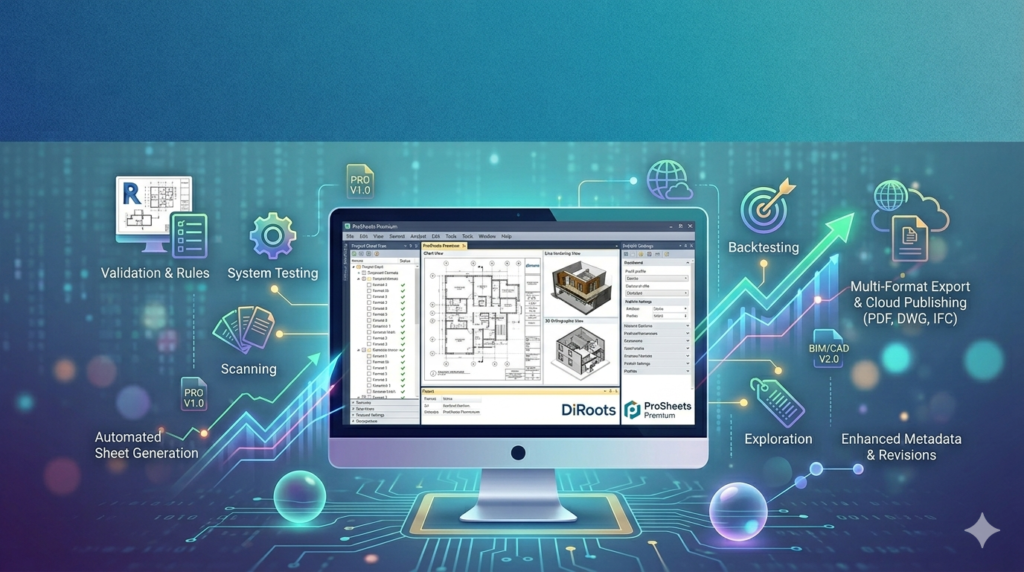
ProSheets Premium is a professional-grade automation add-in designed for Autodesk Revit and other CAD platforms. It eliminates repetitive manual tasks by enabling users to batch export, rename, organize, and publish drawing sheets in multiple formats—including PDF, DWG, DWF, and image files.
Instead of opening hundreds of sheets individually, ProSheets uses rule-based configurations to process entire documentation sets in minutes. This reduces human error, ensures naming consistency, and accelerates project delivery timelines.
Designed for BIM managers, architects, and structural engineers, the tool transforms chaotic documentation workflows into structured, repeatable automation sequences.
Key Features of ProSheets Premium
The software provides a robust feature set beyond simple batch printing. Below are the core capabilities that establish its authority in the sheet automation niche.
-
Batch Sheet Publishing – Export unlimited sheets simultaneously to PDF, DWG, DWF, or PNG.
-
Intelligent File Naming – Use sheet parameters (e.g., Sheet Number, Project Name, Revision) to auto-generate file names.
-
Multi-Format Output – Publish the same sheet set to multiple formats in one operation.
-
Conditional Export Logic – Define rules to include or exclude sheets based on parameters (e.g., status, discipline).
-
Sheet Parameter Mapping – Map Revit or CAD parameters to output metadata for better document control.
-
Automated Folder Structure – Create dynamic folder hierarchies based on sheet data (e.g.,
\Discipline\Sheet Number\). -
Combined or Single PDFs – Generate one master PDF or individual files per sheet.
-
Revision Management – Track and publish only revised sheets in updated submission packages.
What’s New in Version 2.1.2.0
Version 2.1.2.0 focuses on performance stability and user experience for enterprise BIM environments.
-
Faster DWG Export – Optimized engine reduces export time by up to 40% for large-format drawings.
-
Enhanced .NET Framework Support – Improved compatibility with Revit 2024 and 2025.
-
Custom Parameter Mapping UI – Redesigned interface for faster rule configuration.
-
Bug Fixes – Resolved rare naming conflicts when exporting sheets with special characters.
System Requirements
For optimal performance with ProSheets Premium 2.1.2.0, ensure your system meets the following recommendations.
| Component | Minimum Requirement | Recommended |
|---|---|---|
| OS | Windows 10 (64-bit) | Windows 11 (64-bit) |
| Host Software | Revit 2021+ or compatible CAD | Revit 2024 / 2025 |
| RAM | 8 GB | 16 GB or higher |
| Processor | Intel i5 / AMD Ryzen 5 | Intel i7 / AMD Ryzen 7 |
| Storage | HDD (500 MB free) | SSD (NVMe) |
| Framework | .NET Framework 4.8 | .NET 6.0+ |
Installation Guide for ProSheets Premium
Proper installation ensures seamless integration with your host design software.
-
Download the official installer from DiRoots or your authorized reseller. Verify that the version matches your CAD/BIM software version.
-
Close all design applications (Revit, AutoCAD, etc.) before proceeding.
-
Run the installer as Administrator (right-click → Run as Administrator).
-
Select your host software when prompted (e.g., Revit 2024).
-
Complete the installation and restart your system if required.
-
Verify integration – Open your host software. ProSheets Premium should appear under the Add-Ins or External Tools tab.
How to Use ProSheets Premium for Batch Sheet Publishing
Follow this workflow to publish a complete drawing set efficiently.
Step 1 – Select Sheets
Launch ProSheets from the add-ins menu. Select the sheets you wish to publish. Use filters to select by discipline, view name, or approval status.
Step 2 – Configure Export Settings
-
Output format: PDF, DWG, DWF, or PNG.
-
Destination: Define a root folder.
-
Naming convention: Use sheet parameters. Example:
[Project Number]_[Sheet Number]_[Sheet Name]
Step 3 – Apply Conditional Rules (Optional)
Set conditions to include sheets only if, for example:
-
Sheet Issue Dateis not blank -
Revisionis later than “00”
Step 4 – Run the Export
Click Publish. ProSheets will process the sheets, create folders, rename files, and output them to the specified location—all without manual intervention.
Best Use Cases for ProSheets Premium
This tool is not a generic PDF printer. It solves specific, high-value problems in technical documentation.
| Use Case | Why ProSheets is Essential |
|---|---|
| Tender Submissions | Generate 200+ sheets as a single indexed PDF with uniform naming in under 10 minutes. |
| Multi-Discipline Coordination | Publish architectural, structural, and MEP sheets simultaneously while maintaining separate folder structures. |
| Weekly Progress Packages | Automatically export only sheets that changed since last Friday using revision tracking. |
| International Compliance | Enforce ISO 19650 naming conventions across all exported files without manual checking. |
| Archive Creation | Generate both PDF (for viewing) and DWG (for editing) archives in one operation. |
Advantages and Limitations of ProSheets Premium
Advantages
-
High ROI – Saves hours per week for documentation teams.
-
Error Reduction – Eliminates typos in file names and folder paths.
-
Scalability – Handles 1,000+ sheets with stable performance.
-
Flexibility – Works with native sheet parameters and custom project parameters.
Limitations
-
Host Dependency – Requires a valid, licensed copy of Revit or compatible CAD software.
-
Learning Curve – Advanced conditional rules require initial configuration time.
-
No Cloud Native Version – Primarily a desktop add-in; no browser-based interface.
Alternatives to ProSheets Premium
If ProSheets does not fit your workflow, consider these alternatives.
| Software | Best For | Key Difference |
|---|---|---|
| DiRoots ProSheets Premium | Advanced rule-based automation | Most flexible naming logic |
| pyRevit | Open-source customization | Requires Python knowledge |
| Ideate Automation | Enterprise compliance | Higher cost, deeper auditing |
| Revit’s Native Export | Simple, occasional exports | No automation or batch naming |
Frequently Asked Questions (FAQ)
Is ProSheets Premium compatible with Revit 2025?
Yes. Version 2.1.2.0 officially supports Revit 2021 through 2025, including Revit LT where add-ins are permitted.
Can ProSheets export sheets to DWG while preserving layer mapping?
Yes. The tool respects your existing DWG export setup and layer mappings defined in the host CAD environment.
Does ProSheets work with PDF plotting or true vector export?
It uses the host software’s PDF engine, ensuring vector output (not scanned images) and selectable text.
How do I obtain a legitimate license for ProSheets Premium?
Purchase directly from the official DiRoots website or authorized resellers. The software requires a valid license key for activation.
Can I try ProSheets before buying?
DiRoots typically offers a fully functional trial period. Check their official website for current trial terms.
Does ProSheets support network licensing for teams?
Yes. Enterprise customers can deploy network licenses, allowing centralized seat management across large teams.
Will ProSheets slow down Revit during export?
No. The tool operates as an external process, freeing Revit’s main thread. You can continue working while exports run in the background.
Final Thoughts
In large-scale infrastructure or high-rise building projects, documentation is not a side task—it is a critical deliverable. Manual sheet publishing becomes a liability when facing tight deadlines and multi-team coordination.
ProSheets Premium transforms documentation from a manual chore into an automated, auditable workflow. It enforces naming standards, reduces revision errors, and allows BIM managers to focus on model quality instead of file management.
For any firm serious about BIM efficiency, ISO 19650 compliance, or simply reducing overtime on submission days, ProSheets Premium 2.1.2.0 is a proven, high-value investment.
Premium Software Support Service
If you need professional help with software installation, setup, or technical configuration, our team is available to assist you.
Contact & Support
For quick assistance and latest updates, connect with us using the links below:
🔹 Direct Telegram Support
https://t.me/PlayoutKing
🔹 Official Telegram Updates Group
https://t.me/yourgroup
Service Policy
- Remote testing available through AnyDesk before confirmation.
• Verify the setup and performance before completing the order.
• Support available for single or multiple systems.
• Step-by-step guidance to ensure smooth installation and working environment.
Our goal is to provide reliable technical assistance so your software runs smoothly without interruptions.