
Download Directory List and Print Pro v4 (The Ultimate Guide to Managing & Printing File Lists) from this link…
Overview of Directory List and Print Pro
Table of Contents
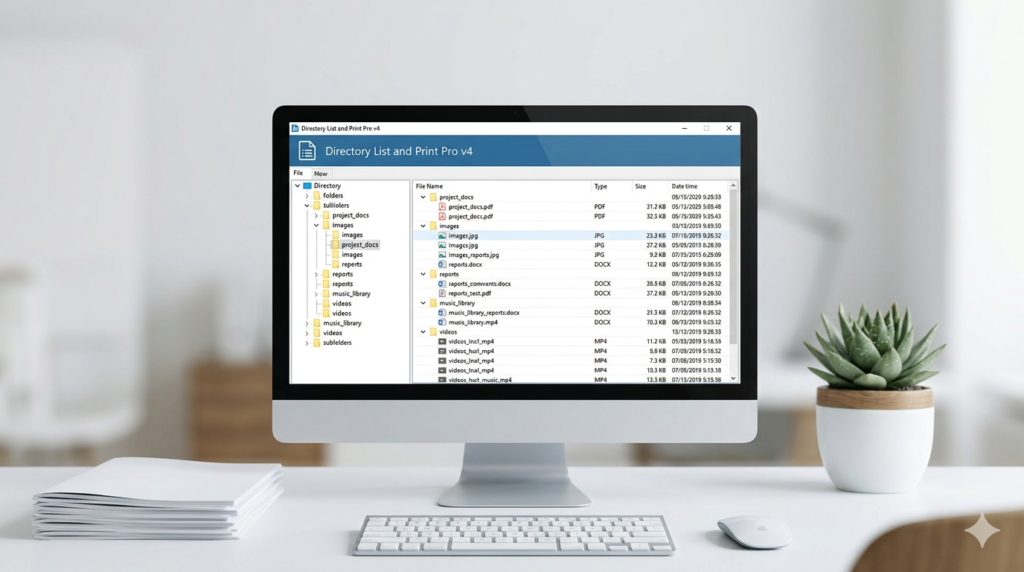
Directory List and Print Pro v4 is a powerful utility software designed to generate detailed lists of files and folders from your Windows directories. Unlike the basic output of the command line, this professional-grade tool allows you to format, filter, and export folder contents into readable formats. Whether you are an IT auditor needing to document server structures, a project manager organizing assets, or a home user cataloging a media collection, this software transforms raw directory data into organized reports.
The primary function of this program is to enable you to list and print folder and directory contents efficiently. It moves beyond simple text lists by allowing you to capture extensive metadata, ensuring that every detail of your file structure is documented for archival or analytical purposes.
Key Features of Directory List and Print Pro v4
This software distinguishes itself through a robust set of features designed for depth and flexibility. Here is a breakdown of its core capabilities:
-
Comprehensive Metadata Extraction
-
It doesn’t just list file names. The tool dives deep into file properties to extract:
-
Image Metadata: EXIF and IPTC data from photos (camera model, date taken, GPS coordinates).
-
Media Information: Audio and video tags (ID3 tags for MP3s, length, bitrate, codec information).
-
Document Details: Author, page count, and title from Office documents and PDFs.
-
-
-
Advanced Filtering and Selection
-
Narrow down massive directories using powerful filters. You can include or exclude files based on:
-
File extensions (e.g., only show .jpg or .pdf files).
-
Date modified or created.
-
File size ranges.
-
Specific text within the filename.
-
-
-
In-App File Management
-
The program acts as a basic file manager. Based on the list you generate, you can perform batch operations directly, including copying, moving, or deleting selected files without needing to locate them manually in File Explorer.
-
-
Flexible Output Formats
-
Generated lists can be exported for use in other applications, ensuring compatibility with common office suites:
-
Direct Integration: Open lists directly in Microsoft Office Word/Excel and OpenOffice/LibreOffice Writer/Calc.
-
File Export: Save as PDF, HTML, XML, or plain text files.
-
Clipboard Export: Copy the entire list to the clipboard for pasting into virtually any other program.
-
-
-
Customizable Directory Favorites
-
Save frequently accessed folders as “favorites” for quick access, streamlining repetitive reporting tasks on critical directories.
-
-
Recursion Depth Control
-
Specify exactly how deep the program scans into subdirectories, preventing information overload and keeping reports concise.
-
What’s New in Directory List and Print Pro v4
While maintaining its core reliability, version 4 introduces enhancements focused on usability and modern file formats:
-
Improved Metadata Parsing: Enhanced support for the latest image and video file formats ensures that newer metadata standards are accurately read.
-
Refined User Interface: The interface has been streamlined for easier navigation, making it simpler for new users to set up complex filters.
-
Performance Optimization: Faster scanning algorithms reduce the time required to index folders with thousands of files, especially over network drives.
System Requirements
To ensure optimal performance of Directory List and Print Pro v4, your system should meet the following specifications:
-
Supported Operating Systems: Windows 11, Windows 10, Windows 8.1, Windows 7 (both 32-bit and 64-bit editions).
-
RAM: 2 GB minimum (4 GB or more recommended for scanning very large directories with extensive metadata).
-
Hard Disk Space: 200 MB of free space for installation and temporary file processing.
Installation Guide
Installing the software is a straightforward process. Follow these steps to get started:
-
Download the Installer: Obtain the official setup file from a trusted software repository or the developer’s website.
-
Run the Executable: Right-click the downloaded .exe file and select “Run as administrator” to ensure it has the necessary permissions to install correctly.
-
Follow the Setup Wizard: The installation wizard will guide you through the process.
-
Accept the End User License Agreement (EULA).
-
Choose the destination folder for the program files.
-
Select any additional tasks, such as creating a desktop shortcut.
-
-
Complete Installation: Click “Install” and wait for the process to finish. Once done, you can launch the program from the Start Menu or the desktop icon.
How to Use Directory List and Print Pro
Creating your first file listing is simple. Here is a basic workflow to get you started:
-
Select Your Directory: Open the program and navigate to the folder you wish to list. You can either type the path or browse using the tree view.
-
Configure Filters (Optional): Go to the filter settings. If you only want MP3 files over 5MB, set the file extension filter to .mp3 and the size filter to “Greater than 5 MB”.
-
Choose Columns and Metadata: Select which attributes you want to display. Check boxes for “File Name”, “Size”, “Date Modified”, and then expand the metadata sections to select “EXIF Data” or “ID3 Tags” if applicable.
-
Generate the List: Click the “Start” or “Refresh” button. The program will scan the directory and populate the main window with your customized list.
-
Export Your Report:
-
To save for later, go to File > Save as and choose your format (e.g., PDF or HTML).
-
To edit in a spreadsheet, go to File > Export > Export to Excel to open the data directly for sorting and charting.
-
Best Use Cases for Directory List and Print Pro
This software is not just for IT professionals; it solves real-world organizational problems across various fields.
-
For Media Professionals and Hobbyists:
-
Use Case: A photographer needs to deliver a shot list to a client.
-
Solution: Scan the delivery folder, include EXIF data like shutter speed and aperture, and export directly to a PDF catalog.
-
-
For Auditors and Compliance Officers:
-
Use Case: Documenting the existence of sensitive files on a server for a security audit.
-
Solution: Run a report on the server folder, filter for document types (.docs, .xls), and export to XML for integration with audit logs.
-
-
For Project Managers and Administrators:
-
Use Case: Creating a bill of materials or asset list from a shared project folder.
-
Solution: Generate a complete tree listing of all project assets, save it as a CSV file, and import it into a project management tool.
-
-
For Home Users:
-
Use Case: Cataloging a collection of family photos or a music library stored on an external hard drive.
-
Solution: Create a printable HTML catalog of the drive, including photo dates and video lengths, to keep an offline inventory.
-
Advantages and Limitations
Understanding the strengths and weaknesses of any tool is key to using it effectively.
Advantages:
-
Depth of Data: Unmatched ability to extract and report on embedded metadata.
-
Format Versatility: Seamless integration with major office suites and common document formats.
-
Batch Operations: Saves time by allowing file actions directly from the generated lists.
-
Precision Filtering: Highly customizable filters allow users to pinpoint exactly the data they need.
Limitations:
-
Windows-Only: It is not available for macOS or Linux natively.
-
Interface Aesthetic: While functional, the user interface retains a classic Windows look that may feel dated to some users.
-
Learning Curve: New users may need a short learning period to understand the full scope of the filtering and export options.
Alternatives to Directory List and Print Pro
Depending on your specific needs, other tools might also serve your purpose. Here are a few alternatives:
-
Karen’s Directory Printer: A long-standing free alternative for basic directory listing and printing. It is reliable but lacks the advanced metadata extraction and modern export features of the Pro version.
-
Print Window Pro (for macOS): If you are on a Mac, this is the go-to alternative, offering similar functionality for printing and cataloging Finder folders.
-
Export to Excel via Command Line: Advanced users can use the Windows tree command or PowerShell scripts to export folder structures to text files, which can then be imported into Excel. This is free but requires technical scripting knowledge and offers no metadata capture.
Frequently Asked Questions
Q1: Can Directory List and Print Pro list files from network drives or external USB drives?
Yes. The software can scan any drive letter accessible by Windows, including mapped network drives, external SSDs, and USB flash drives, provided the user has read permissions.
Q2: Is it possible to save a specific configuration of columns and filters for future use?
While the program remembers the last used settings, you can save specific directories as “Favorites.” To reuse a complex filter setup, you typically apply the same filter rules each time you load a favorite directory.
Q3: Does the software allow me to print the file list directly?
Absolutely. Once you have generated your list, you can use the built-in print preview and print functions to send the formatted table directly to a printer.
Q4: Can I list only the folder structure without including the individual files?
Yes, by configuring the filter settings to exclude files, you can generate a report that shows only the hierarchical tree of folders and subfolders.
Q5: Is there a portable version available that doesn’t require installation?
The standard version typically requires installation. However, check the official documentation, as some versions or licenses may allow for an installed instance, but it is not primarily designed as a portable app.
Q6: What audio file tags are supported for MP3 collection listing?
The software supports standard ID3 tags. This typically includes Track Title, Artist, Album, Year, Genre, Comments, and Track Number.
Final Thoughts
Directory List and Print Pro v4 remains the gold standard for users who need to document their digital file structures with precision. Its ability to bridge the gap between a simple file list and a rich data report makes it an indispensable tool for organization, auditing, and media management.
While it is a niche tool, for those who need its specific capabilities—particularly the deep metadata extraction and flexible output—it offers a level of functionality that free alternatives and manual methods simply cannot match. It is a reliable, professional-grade utility that brings clarity and order to the contents of your hard drive.
Premium Software Support Service
If you need professional help with software installation, setup, or technical configuration, our team is available to assist you.
Contact & Support
For quick assistance and latest updates, connect with us using the links below:
🔹 Direct Telegram Support
https://t.me/PlayoutKing
🔹 Official Telegram Updates Group
https://t.me/yourgroup
Service Policy
- Remote testing available through AnyDesk before confirmation.
• Verify the setup and performance before completing the order.
• Support available for single or multiple systems.
• Step-by-step guidance to ensure smooth installation and working environment.
Our goal is to provide reliable technical assistance so your software runs smoothly without interruptions.