
Download the D Delayer V2.4.1 (Advanced Signal Timing & High-Definition Audio Delay Processor) Software from this link…

Overview of D Delayer V2.4.1
Table of Contents
D Delayer V2.4.1 is a specialized utility software designed for precision timing correction in audio and video signal processing environments. Unlike standard media players, this tool focuses on millisecond-accurate signal delay, making it an essential asset for broadcast engineers, live sound technicians, and post-production professionals.
This version focuses on latency compensation, ensuring that audio streams sync perfectly with video sources or that complex signal chains do not suffer from phase cancellation. The software operates by buffering incoming data streams and releasing them according to user-defined parameters, effectively solving synchronization mismatches without degrading the original signal quality.
Key Features
The functionality of D Delayer V2.4.1 is built around high-precision control and low system resource consumption. Below are the core technical capabilities:
-
Millisecond Precision Timing: Allows users to set delay offsets with 1ms accuracy, suitable for aligning lip-sync issues or compensating for long cable runs.
-
Multiple Signal Routing Support: Capable of processing various input sources, including live microphone arrays and pre-recorded audio tracks.
-
Bypass Mode: A dedicated switch to compare the delayed signal against the original “dry” signal in real-time.
-
Low Latency Monitoring: Optimized drivers ensure that the delay process does not introduce additional system lag beyond the defined parameters.
-
Preset Management: Save and load specific delay configurations for different venues, hardware setups, or streaming platforms.
What’s New in D Delayer V2.4.1
The latest iteration focuses on stability and workflow integration. D Delayer V2.4.1 introduces specific upgrades requested by professional users:
-
Improved GUI Scaling: The interface now supports high-DPI monitors, ensuring that timeline sliders and numerical readouts are sharp on 4K displays.
-
Session Auto-Save: The software now automatically restores your last working state in the event of a power failure or system crash.
-
Enhanced ASIO Driver Support: Lower round-trip latency when routing signals through external audio interfaces.
-
Dark Mode Toggle: A full UI dark theme to reduce eye strain during long mixing or editing sessions.
System Requirements
To run D Delayer V2.4.1 efficiently without buffer underruns or audio pops, your workstation should meet the following specifications:
-
Operating System: Windows 10 (64-bit) or Windows 11; macOS 11 (Big Sur) or later (Intel/Apple Silicon native).
-
Processor: Intel Core i5 (8th gen) or AMD Ryzen 3 equivalent (higher for multi-channel processing).
-
RAM: 4 GB minimum (8 GB recommended for complex signal chains).
-
Storage: 200 MB free disk space (SSD recommended for real-time processing).
-
Audio Hardware: Any Windows Audio, ASIO, or Core Audio compliant sound card.
Installation Guide
Installing D Delayer V2.4.1 is a straightforward process designed to minimize disruption to existing audio drivers.
-
Download the Executable: Obtain the installer from the official distribution channel.
-
Run as Administrator (Windows): Right-click the installer and select “Run as Administrator” to ensure proper driver registration.
-
Follow the Wizard: Accept the license agreement and select the installation directory (default is recommended for standard users).
-
Driver Installation: If prompted by the OS regarding audio device installation, select “Allow” or “Install” to enable low-latency processing.
-
Restart: A system reboot is generally not required, but restarting your DAW (Digital Audio Workstation) or audio engine is recommended.
How to Use the Software
Optimizing signal timing with D Delayer V2.4.1 requires understanding the signal flow. Follow these steps for standard operation:
-
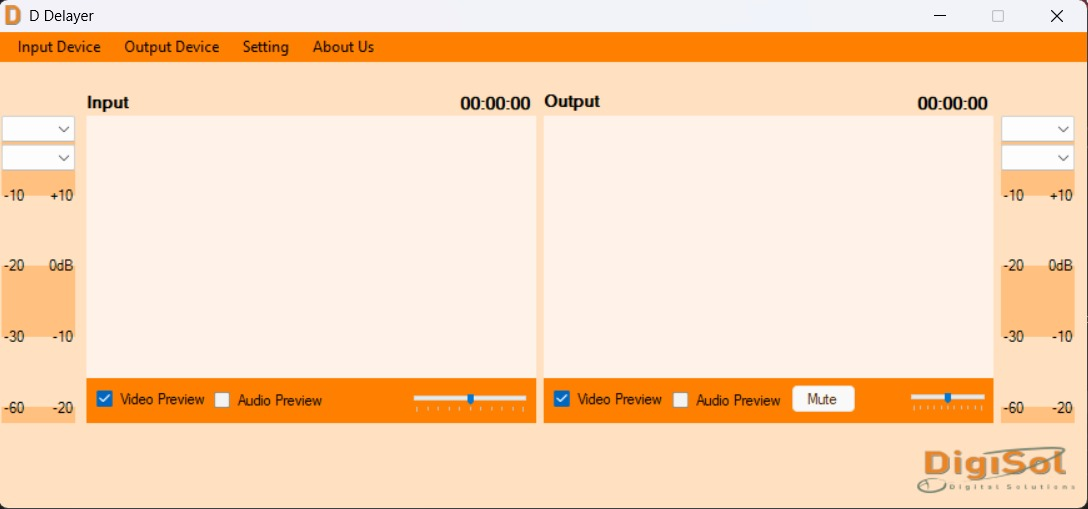
Select Input Source: Navigate to the “Audio Settings” menu and choose your input device (e.g., Microphone, Line In, or Virtual Audio Cable).
-
Set Output Routing: Choose where the processed signal should be sent (e.g., Speakers, Headphones, or Broadcast Stream).
-
Adjust the Delay Slider: Move the time slider to the right to increase the delay (measured in milliseconds). For lip-sync correction, start at 150ms and adjust incrementally.
-
Phase Alignment: Use the “Phase Invert” button if the delayed signal is canceling out the dry signal due to polarity issues.
-
Test the Signal: Speak into the microphone or play a test tone. Toggle the “Bypass” switch to hear the difference between the original and delayed signal.
Best Use Cases
D Delayer V2.4.1 is not a general-purpose audio player; it is a surgical tool for specific technical scenarios. The primary high-value use cases include:
-
Live Streaming & Webinars: Correcting audio drift where the microphone is physically closer to the sound source than the video camera.
-
Home Theater Calibration: Compensating for the processing lag introduced by large-screen smart TVs or video projectors.
-
Musician Monitoring: Allowing musicians to add a slight delay to their in-ear monitors to align with the room’s natural reverb or a distant backing track.
-
System Alignment (PA Systems): Delaying the signal to the “fill” speakers so that they align perfectly with the main speaker stack, eliminating echo in large venues.
Advantages and Limitations
Understanding the technical trade-offs of D Delayer V2.4.1 ensures realistic expectations for performance.
Advantages
-
Ultra-Low CPU Usage: Optimized C++ code ensures the software runs in the background without glitching recording software.
-
Visual Waveform Feedback: The latest version includes a simple oscilloscope view to visually see the offset between input and output.
-
Precision: Achieves exact frame-accurate delay (1 frame = ~32ms for 30fps video).
Limitations
-
Memory Buffer Limit: The maximum delay buffer is capped at 2000ms (2 seconds) to prevent excessive RAM usage; it cannot be used for long-form podcast storage.
-
Single Instance Limitation: Running multiple instances of the processor simultaneously may cause driver conflicts unless using a virtual audio cable aggregator.
Alternatives to the Software
Depending on your specific workflow, other tools may offer different feature sets. Compare D Delayer V2.4.1 against these alternatives:
| Software | Primary Focus | Best For |
|---|---|---|
| Voicemeeter Banana | Virtual mixing & routing | Users needing a full virtual mixer with delay built into a larger matrix. |
| ReaPlugs (ReaDelay) | VST Plugin (DAW specific) | Producers needing delay as an effect within a recording session (not standalone). |
| SoundDelay | Simple standalone delay | Very basic, free operations without the advanced precision timing of V2.4.1. |
Frequently Asked Questions
Is D Delayer V2.4.1 compatible with Digital Audio Workstations (DAWs)?
Yes, it works as a standalone processor, but it can be routed into DAWs like Ableton or Pro Tools using virtual audio cables as a bridge.
Will this software fix audio drift in long video files (over 1 hour)?
D Delayer V2.4.1 applies a constant delay. If your drift is progressive (gets worse over time), you need a sample-rate conversion tool, not a delay processor.
Does D Delayer V2.4.1 work with Bluetooth headphones?
Technically yes, but Bluetooth has inherent variable latency (usually 150ms–300ms). Adding extra software delay to Bluetooth may result in double latency. Wired connections are recommended for precision work.
How do I reset the software to default settings?
Go to File > Reset Configuration or simply delete the configuration XML file located in the user AppData folder.
Does this software support surround sound (5.1 or 7.1)?
Version V2.4.1 supports multi-channel routing, allowing you to delay individual channels within a 5.1 mix independently.
Why is there a popping sound when I adjust the slider?
This is likely “zipper noise,” a common artifact when adjusting real-time audio buffers. Use the “Smooth Fade” button in the settings to eliminate this.
Final Thoughts
D Delayer V2.4.1 remains a robust solution for solving real-world timing issues that plague digital audio workstations and live sound environments. While it does not attempt to be a full Digital Audio Workstation, its focus on one task—precision delay—allows it to outperform bloated alternative software in stability and accuracy.
For the broadcast engineer dealing with satellite feed latency or the home studio owner fighting with USB microphone lag, this utility provides a professional-grade fix without unnecessary complexity.
Premium Software Support Service
If you need professional help with software installation, setup, or technical configuration, our team is available to assist you.
Contact & Support
For quick assistance and latest updates, connect with us using the links below:
🔹 Direct Telegram Support
https://t.me/PlayoutKing
🔹 Official Telegram Updates Group
https://t.me/yourgroup
Service Policy
- Remote testing available through AnyDesk before confirmation.
• Verify the setup and performance before completing the order.
• Support available for single or multiple systems.
• Step-by-step guidance to ensure smooth installation and working environment.
Our goal is to provide reliable technical assistance so your software runs smoothly without interruptions.