
Download Carrier HAP v6.2 (Comprehensive Guide to the Hourly Analysis Program for HVAC Design) from this link…
Overview of the Software
Table of Contents
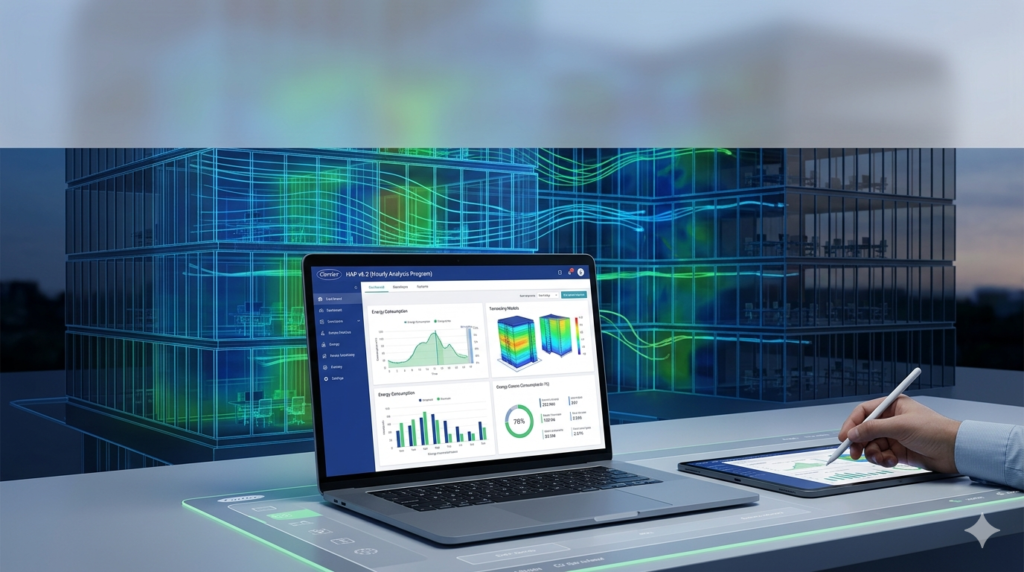
Carrier HAP (Hourly Analysis Program) v6.2 is a premier HVAC design and energy analysis software widely regarded as the industry standard for consulting engineers, design/build contractors, and HVAC professionals. Unlike basic load calculation tools, HAP integrates two critical functions into a single platform: detailed HVAC system design and comprehensive annual energy cost analysis.
By combining these capabilities, Carrier HAP v6.2 allows engineers to seamlessly transition from sizing equipment to modeling energy consumption. This integration saves significant project time, reduces data re-entry errors, and enables professionals to evaluate the lifecycle cost of design alternatives before construction begins. Whether for new construction, retrofits, or energy conservation projects, this tool provides the granularity needed to optimize building performance.
Key Features
Carrier HAP v6.2 stands out due to its robust feature set tailored for modern commercial building demands. The software utilizes a sophisticated calculation engine that adheres to ASHRAE standards, ensuring accuracy in both design and analysis phases.
-
Integrated System Design: Perform detailed cooling and heating load calculations using the ASHRAE Transfer Function Method. The software automates the sizing of airside systems (air handlers, VAV boxes) and plants (chillers, boilers).
-
Annual Energy Simulation: Model 8,760 hours of building operation to forecast energy consumption and utility costs. This allows for precise comparison of energy efficiency measures (EEMs) against baseline models.
-
3D Building Modeling: Create 3D building models to define zones with complex geometries, window-to-wall ratios, and shading effects, improving the accuracy of solar load calculations.
-
VRF System Support: Native support for Variable Refrigerant Flow (VRF) systems, allowing users to model the part-load performance and energy efficiency of these increasingly popular systems accurately.
-
Customizable Reporting: Generate professional, customizable reports for load calculations, equipment schedules, and LEED (Leadership in Energy and Environmental Design) energy modeling documentation.
-
Plant Simulation: Model complex central plants, including chillers with free cooling, thermal storage tanks, and boiler plants with staging strategies.
What’s New in Carrier HAP v6.2
While HAP v6.x has established a stable foundation, version 6.2 introduces specific enhancements aimed at improving workflow efficiency and user experience. Key updates in this release focus on performance optimization and interface refinement.
-
Enhanced User Interface: Updates to the interface improve navigation through complex projects, making it easier to manage large building files with multiple zones and systems.
-
Improved Calculation Speed: Optimizations in the simulation engine reduce processing time for large-scale projects, particularly those involving complex annual energy simulations.
-
Updated Utility Rate Structures: Expanded templates for utility rate structures allow for more accurate modeling of demand charges, time-of-use rates, and seasonal variations in energy costs.
-
Data Export Capabilities: Improved integration with Microsoft Excel allows for easier manipulation of input data and simulation results for further analysis or presentation.
System Requirements
To ensure stable performance for both design and energy modeling tasks, your system should meet the following specifications for Carrier HAP v6.2.
| Component | Minimum Requirement | Recommended Requirement |
|---|---|---|
| Operating System | Windows 10 (64-bit) | Windows 11 (64-bit) |
| Processor | 2.0 GHz Dual-Core | 3.0 GHz+ Quad-Core |
| RAM | 8 GB | 16 GB or higher |
| Hard Disk | 5 GB of free space | SSD with 10 GB free space |
| Display | 1366 x 768 resolution | 1920 x 1080 resolution or higher |
| Software | Microsoft .NET Framework 4.7.2 | Microsoft Excel for reporting exports |
Installation Guide
Installing Carrier HAP v6.2 requires administrative privileges. The software uses a hardware-locked or software-based license management system. Follow these steps for a standard installation:
-
Obtain the Installer: Download the official executable file from the Carrier software portal or your authorized distributor. Do not download installers from third-party file-sharing sites.
-
Prepare Your System: Close all running applications, especially antivirus software temporarily, to prevent interference with the installation process. Ensure Windows is fully updated.
-
Run the Installer: Right-click the
.exefile and select “Run as Administrator.” Follow the on-screen prompts, accepting the license agreement. -
Activate License: Upon first launch, you will be prompted to activate your license. Enter the serial key provided with your purchase. For USB hardware keys (dongles), ensure they are inserted before launching the software.
-
Check for Updates: After installation, use the built-in “Check for Updates” feature to ensure you have the latest patches and database updates.
How to Use the Software
While HAP is a professional-grade tool, its workflow follows a logical sequence. Mastering this sequence allows for efficient project completion.
-
Project Setup: Begin by creating a new project. Define the project location, which automatically imports weather data for that specific climate zone.
-
Building Definition: Define the building’s physical characteristics. Input wall constructions, roof types, glass properties, and internal loads (lighting, people, equipment). Use the 3D modeling tools to allocate these properties to specific spaces.
-
System Design: Create airside systems (e.g., VAV with reheat, single-zone rooftop, VRF). Assign spaces (zones) to these systems. The software will calculate peak loads to automatically size coils, fans, and terminals.
-
Plant Design: Define central plants (chillers, boilers, cooling towers). Connect airside systems to the central plant to simulate the total building energy flow.
-
Energy Simulation: Configure the simulation parameters, including schedules (occupancy, lighting) and utility rates. Run the annual simulation to generate energy consumption and cost reports.
-
Analysis: Review the results. Compare the baseline design against proposed energy conservation measures to determine payback periods and operational savings.
Best Use Cases
Carrier HAP v6.2 is versatile enough to handle a wide spectrum of building types and HVAC configurations. It is the tool of choice for projects requiring rigorous engineering analysis.
-
Large Commercial Buildings: Ideal for high-rise office buildings, hotels, and hospitals where complex central plants and VAV systems are standard.
-
Retail and Mixed-Use: Strip shopping centers and mixed-use developments benefit from the ability to model diverse occupancy schedules and system types within a single project file.
-
Schools and Universities: Perfect for modeling the variable occupancy loads of classrooms, auditoriums, and gymnasiums, as well as central campus utility plants.
-
LEED Certification Projects: The simulation engine provides the necessary data for Energy & Atmosphere (EA) credits, facilitating LEED submissions and compliance with energy codes like ASHRAE 90.1.
-
VRF System Optimization: For projects utilizing Variable Refrigerant Flow technology, HAP accurately models the part-load efficiency to justify the higher upfront costs with long-term operational savings.
Advantages and Limitations
Advantages
-
Integration: The ability to use load calculation data directly in energy models saves time and ensures consistency.
-
Industry Acceptance: HAP results are widely accepted by code officials, utility companies, and green building certification bodies.
-
Comprehensive Reporting: Generates detailed, professional reports that are essential for permit submission and client presentations.
-
Complex System Modeling: Handles complex central plants and advanced control strategies (economizers, demand control ventilation) better than many competitors.
Limitations
-
Learning Curve: Due to its comprehensive nature, new users may find the interface and terminology complex compared to simpler load calculation tools.
-
Cost: As a premium professional tool, the licensing cost is significant, typically aimed at firms rather than individual hobbyists.
-
Platform Exclusivity: Currently only available for Windows, limiting use for teams primarily using macOS or Linux workstations.
Alternatives to the Software
Depending on the specific project scope, professionals may consider these alternatives to Carrier HAP.
| Software | Best For | Key Difference |
|---|---|---|
| Trane TRACE 3D Plus | Advanced 3D modeling & LEED | Offers a more modern, fully 3D geometric interface compared to HAP’s traditional layout. |
| EnergyPlus | Research-grade simulation | Open-source and highly detailed, but requires a steep learning curve and often a separate interface (like OpenStudio). |
| Elite Software CHVAC | Quick load calculations | Focuses primarily on load calculation without the depth of annual energy simulation that HAP provides. |
| IES Virtual Environment | Integrated analysis (lighting, CFD) | A broader suite that includes lighting simulation and computational fluid dynamics, making it better for holistic building performance. |
Frequently Asked Questions
Is Carrier HAP compatible with macOS?
Carrier HAP is designed for the Windows operating system. To run it on a Mac, users typically need to use virtualization software such as Parallels Desktop or VMware Fusion to run a Windows environment.
Can HAP model geothermal heat pump (GSHP) systems?
Yes, HAP can model ground-source heat pump systems. It allows users to define ground loop configurations and model the performance of water-source heat pumps connected to a geothermal loop field.
Does HAP comply with ASHRAE 90.1 for energy modeling?
Yes. Carrier HAP is specifically designed to comply with the energy modeling requirements of ASHRAE 90.1, making it suitable for performance rating methods and LEED certification projects.
How do I transfer a license to a new computer?
Carrier uses a license management tool. Typically, you must deactivate the license on the old machine via the software interface before activating it on the new machine. If using a USB hardware key, you simply move the key to the new computer.
What is the difference between HAP and Carrier’s Block Load program?
HAP is a full-featured tool for both system design and annual energy analysis. Carrier’s Block Load program is a simpler, more basic tool focused primarily on calculating peak heating and cooling loads for equipment selection.
Final Thoughts
Carrier HAP v6.2 remains a cornerstone tool for the HVAC design community. Its strength lies not just in calculating loads, but in bridging the gap between equipment sizing and operational cost analysis. For engineers committed to delivering high-efficiency buildings that meet strict energy codes, the Hourly Analysis Program offers the precision, reliability, and professional credibility required. While it presents a learning curve and requires a significant investment, the return is realized through faster project approvals, optimized system designs, and verifiable energy savings for clients. For any professional serious about commercial HVAC engineering, mastery of HAP is a critical asset.
Premium Software Support Service
If you need professional help with software installation, setup, or technical configuration, our team is available to assist you.
Contact & Support
For quick assistance and latest updates, connect with us using the links below:
🔹 Direct Telegram Support
https://t.me/PlayoutKing
🔹 Official Telegram Updates Group
https://t.me/yourgroup
Service Policy
- Remote testing available through AnyDesk before confirmation.
• Verify the setup and performance before completing the order.
• Support available for single or multiple systems.
• Step-by-step guidance to ensure smooth installation and working environment.
Our goal is to provide reliable technical assistance so your software runs smoothly without interruptions.