
Download AdGuard 7.22.6 (5267) (Advanced Ad Blocking with Enhanced Userscript Support) from this link…

Overview of AdGuard
Table of Contents
AdGuard is a premier, cross-platform ad-blocking software renowned for its ability to eliminate intrusive advertisements, block trackers, and enhance online privacy. Unlike browser extensions, AdGuard operates as a standalone application, filtering traffic at the network level across all browsers and applications on your device. The latest release, AdGuard 7.22.6 (5267), is a significant update that focuses on improving customization capabilities through advanced userscript compatibility, alongside expanding its availability to a wider audience through the Microsoft Store.
This version solidifies AdGuard’s position not just as an ad blocker, but as a comprehensive content-filtering tool for users who demand granular control over their internet experience. It combines robust security features with a user-friendly interface, making it suitable for both beginners and advanced users seeking a private, streamlined, and safer web environment.
Key Features
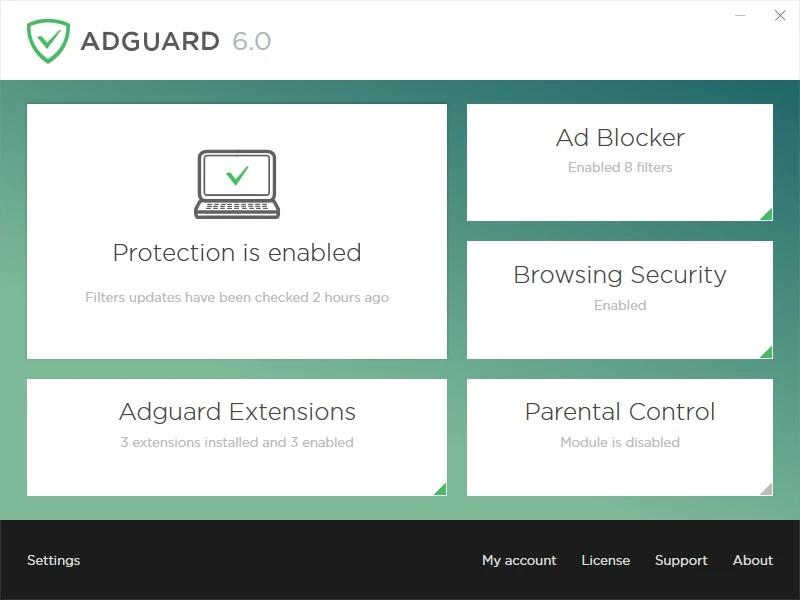
AdGuard is packed with features that go beyond simple ad blocking, offering a complete suite for privacy and security management.
-
System-Wide Ad Blocking: Removes ads from all browsers and apps, not just one. This includes blocking pop-ups, video ads, banners, and text ads.
-
Privacy Protection: Blocks trackers, analytics systems, and ad networks that monitor your online activity, significantly enhancing your digital privacy.
-
Parental Control: Allows you to manage your family’s online safety by blocking access to adult content, social media platforms, and other potentially harmful websites.
-
Security Filtering: Protects your device from malware and phishing websites by checking every site against a regularly updated database of malicious resources.
-
DNS Filtering: Offers the ability to set up a custom DNS server or use AdGuard DNS to block ads and trackers at the DNS level, which can be faster and more efficient.
-
Stealth Mode: A unique feature that protects you from common online tracking methods by hiding your digital footprint. This includes removing your IP address from HTTP headers, disabling third-party cookies, and more.
-
Browsing Security: Warns you before you visit a malicious website or download a harmful file, preventing potential infections.
-
Userscript Support: The cornerstone of this new release. Allows for advanced customization by running user-created scripts (like userscripts) to modify web page behavior, add new functionality, or automate tasks.
What’s New in AdGuard 7.22.6 (5267)
The AdGuard 7.22.6 update introduces two major enhancements that significantly improve the software’s flexibility and accessibility.
1. Enhanced Userscript Compatibility with CoreLibs v1.19
This release integrates CoreLibs v1.19, which brings a critical improvement: seamless support for Single Page Applications (SPAs) like YouTube, Gmail, and Facebook. Previously, userscripts designed for SPAs often failed to load or execute correctly when navigating within the app. This update fixes that limitation by ensuring that scripts are properly injected and triggered on all pages within an SPA. This makes AdGuard a powerful platform for advanced customization.
Practical Example: The SponsorBlock Userscript
This improvement allows AdGuard to fully support powerful tools like the SponsorBlock userscript. This community-driven tool automatically skips sponsored segments, self-promotions, and intros in YouTube videos, providing a truly uninterrupted viewing experience.
2. Availability in the Microsoft Store
AdGuard Ad Blocker is now officially available for download from the Microsoft Store. This new distribution channel offers several benefits:
-
Simplified Installation: A one-click installation process, managed directly by the Microsoft Store.
-
Secure Updates: Updates are delivered automatically through the Store, ensuring you always have the latest security patches and features.
-
Centralized Management: Manage AdGuard alongside your other Windows apps in a single location.
-
Unchanged Licensing: Subscriptions and licenses are still managed through AdGuard’s official website, giving you the same flexibility and control.
System Requirements
To run AdGuard 7.22.6 smoothly, your system should meet the following specifications:
| Component | Minimum Requirement |
|---|---|
| Operating System | Windows 7 (SP1), Windows 8, Windows 8.1, Windows 10, Windows 11 |
| Processor | 1 GHz or faster |
| RAM | 1 GB (2 GB recommended) |
| Disk Space | 150 MB of free space |
| Network | Internet connection for installation and updates |
Installation Guide
Installing AdGuard is a straightforward process, regardless of your preferred method.
Method 1: Installation from the Microsoft Store
-
Open the Microsoft Store on your Windows device.
-
Search for “AdGuard Ad Blocker.”
-
Click on the official AdGuard app from the search results.
-
Click the Install button.
-
Once installed, launch the app from the Start Menu or the Store.
Method 2: Installation from the Official Website
-
Visit the official AdGuard website.
-
Navigate to the “Download” section and download the installer for Windows.
-
Locate the downloaded file (e.g.,
adguard.exe) and double-click it to run the installer. -
Follow the on-screen instructions in the setup wizard.
-
After installation, launch AdGuard and follow the initial setup guide to configure your preferences.
How to Use the Software
Using AdGuard effectively involves understanding its main interface and settings.
-
Launch and Locate: After installation, you can find the AdGuard icon in your system tray (near the clock). Right-click for quick actions or double-click to open the main application window.
-
Enable Protection: The main switch at the top of the dashboard turns the filtering on or off. Make sure it’s toggled on to start blocking ads and trackers.
-
Configure Filters: Go to Settings → Filters to choose which ad-blocking, privacy, and security lists you want to use. AdGuard’s own filter is enabled by default and is highly effective for most users.
-
Set Up Stealth Mode: Navigate to Settings → Stealth Mode. Here you can choose a protection level (e.g., High, Medium) or manually customize which trackers and user data to block.
-
Add a Userscript: To utilize the new SPA compatibility:
-
Go to Extensions → Add extension → Import from file or URL.
-
Paste the URL of a userscript (e.g., the SponsorBlock script from
https://mchangrh.github.io/sb.js/). -
Click Confirm to add it. The script will now run across all compatible websites, including SPAs like YouTube.
-
Best Use Cases
AdGuard 7.22.6 is a versatile tool that can be tailored for various scenarios:
-
For Privacy-Conscious Users: Enable all privacy filters and Stealth Mode to maximize data protection. This is ideal for journalists, researchers, or anyone who values their digital anonymity.
-
For Families: Utilize the Parental Control module to create a safe browsing environment for children, blocking inappropriate content without needing to configure each browser separately.
-
For Power Users & Developers: Leverage the improved userscript support to run custom scripts like SponsorBlock, or develop and test their own scripts within a stable, SPA-compatible environment.
-
For General Users Seeking a Clean Web: Simply install and enable the default settings for an immediate, noticeable reduction in ads and a faster, cleaner browsing experience across all browsers and apps.
Advantages and Limitations
Advantages
-
System-Wide Filtering: Blocks ads in all browsers and applications, including those in games and Windows apps.
-
Enhanced Privacy: Offers superior privacy tools like Stealth Mode that browser extensions cannot match.
-
High Performance: Filters traffic efficiently with minimal impact on system resources and browsing speed.
-
Customizable: Provides granular control over filters, DNS, and userscripts for a tailored experience.
-
Now on Microsoft Store: Offers a convenient, secure installation and update channel for Windows users.
Limitations
-
Paid Software: While a free trial is available, the full features require a paid license, unlike many free browser extensions.
-
Learning Curve: Some advanced features, like DNS filtering and userscript management, may require a bit of learning for new users.
-
Potential Overblocking: In rare cases, some aggressive filters might break website functionality. This is easily fixable by adding the site to the allowlist.
Alternatives to the Software
While AdGuard is a top-tier solution, several alternatives exist, each with its own focus.
| Software | Key Focus | Platform | Key Difference |
|---|---|---|---|
| uBlock Origin | Lightweight browser ad blocking | Browser Extensions | Free, open-source, and highly efficient for browsers but not system-wide. |
| Pi-hole | Network-wide ad blocking | Network Level (Requires a Raspberry Pi or server) | Blocks ads for every device on your home network, including IoT devices. |
| Ghostery | Privacy and tracker blocking | Browser Extension | Focuses heavily on privacy and provides detailed insights on trackers. |
| AdBlock Plus | General ad blocking | Browser Extension | One of the most popular free extensions, known for its “Acceptable Ads” program. |
Frequently Asked Questions
Q: What is the difference between AdGuard and a browser ad-blocking extension?
A: AdGuard is a system-wide application that filters all traffic from your computer, including from non-browser apps. Browser extensions, like uBlock Origin, only filter within that specific browser, leaving other apps and browsers unprotected.
Q: Does AdGuard work with Single Page Applications (SPAs) like YouTube?
A: Yes, starting with version 7.22.6, AdGuard features significantly improved compatibility with SPAs. This ensures that userscripts and certain filters work correctly when navigating within sites like YouTube, Gmail, and Facebook.
Q: How do I install a userscript in AdGuard?
A: You can install a userscript by navigating to Extensions in the AdGuard app, clicking “Add extension,” and then selecting “Import from file or URL.” You can paste the direct link to the script (e.g., for SponsorBlock) and click confirm.
Q: Is the Microsoft Store version of AdGuard the same as the one from the official website?
A: Yes, the core functionality is identical. The Microsoft Store version is simply a new distribution channel, providing the convenience of automated updates and management through the Store.
Q: Does AdGuard slow down my internet connection?
A: Generally, no. By blocking ads, AdGuard often makes pages load faster because it prevents the download of large ad files. While it does filter traffic in real-time, the process is highly optimized and has a negligible impact on system performance.
Q: Can I use AdGuard with a VPN?
A: Yes, AdGuard is compatible with most VPNs. For best results, it’s recommended to add your VPN’s application as an exception in AdGuard’s “Network” settings to avoid any potential conflicts.
Final Thoughts
AdGuard 7.22.6 (5267) is a robust update that reinforces its status as a leading ad-blocking and privacy software. The enhanced compatibility with Single Page Applications opens up new possibilities for customization through userscripts, making it an even more powerful tool for advanced users. The addition of the Microsoft Store distribution channel simplifies access and management for new and existing users alike.
Whether you are a privacy advocate, a parent seeking to create a safe digital environment, or simply a user tired of intrusive ads, AdGuard offers a comprehensive, high-performance, and legally safe solution. With its focus on user control, privacy, and now greater accessibility, AdGuard remains a top-tier choice for anyone looking to reclaim their online experience.
Premium Software Support Service
If you need professional help with software installation, setup, or technical configuration, our team is available to assist you.
Contact & Support
For quick assistance and latest updates, connect with us using the links below:
🔹 Direct Telegram Support
https://t.me/PlayoutKing
🔹 Official Telegram Updates Group
https://t.me/yourgroup
Service Policy
- Remote testing available through AnyDesk before confirmation.
• Verify the setup and performance before completing the order.
• Support available for single or multiple systems.
• Step-by-step guidance to ensure smooth installation and working environment.
Our goal is to provide reliable technical assistance so your software runs smoothly without interruptions.